Generate publication-quality P&IDs and process flow diagrams from a topological flowsheet, in pure Python with no runtime dependencies.
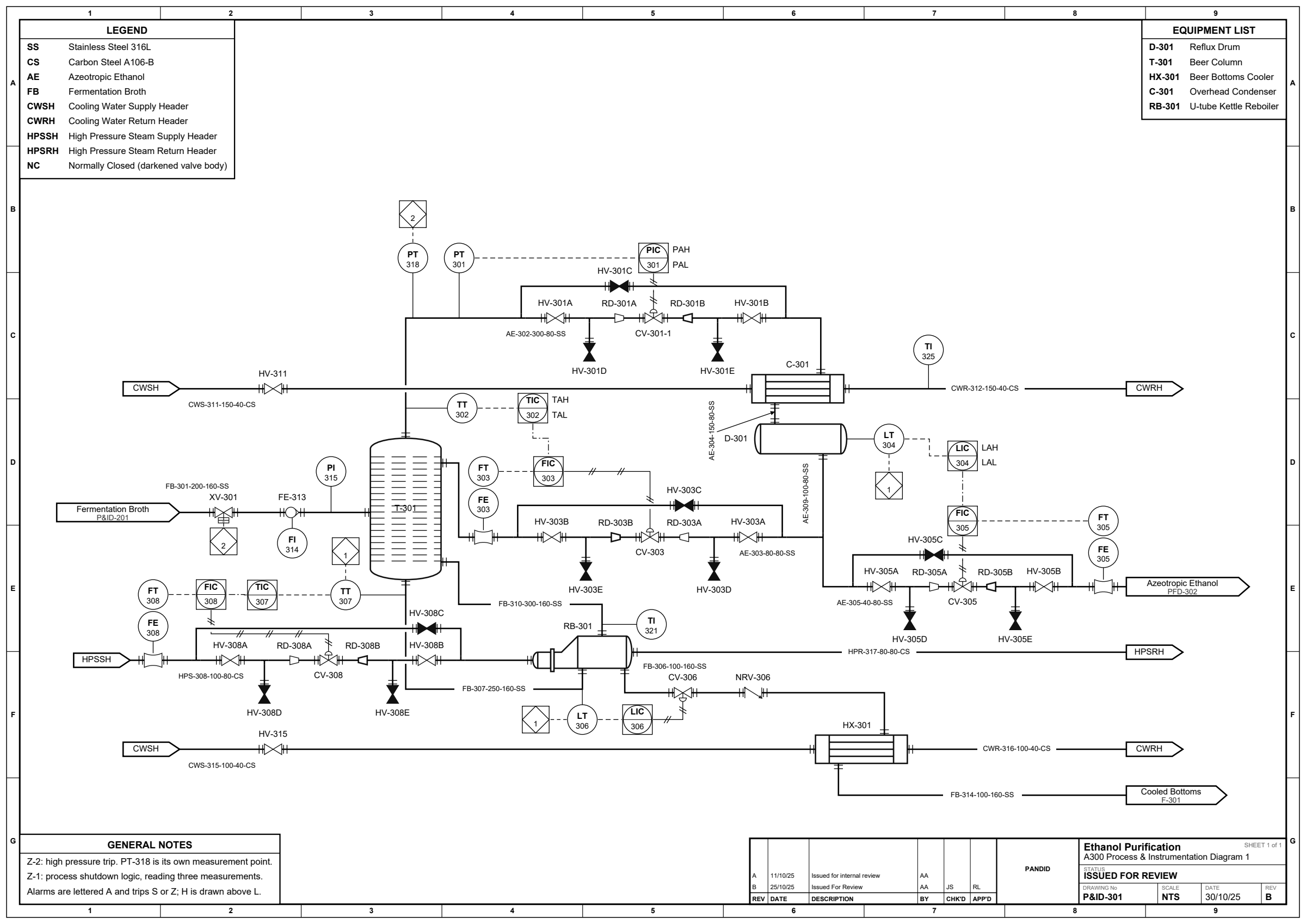
examples/11_ethanol_pid.py: instrumentation, five control loops, hand-isolated valve stations, line numbers, a zone-ruled A3 frame, a title block and a general-notes box. See the gallery for the rest.
You describe what connects to what. The engine lays out the equipment, routes every stream, and draws industry-standard symbols.
Requires Python 3.10 or later. Fully type-hinted and marked
PEP 561, so mypy and pyright read the
annotations straight out of the wheel.
pip install pandid
pip install 'pandid[pdf]'    # optional PDF/PNG export backend (wheels only)
pip install 'pandid[yaml]'   # optional YAML spec reader (Flowsheet.from_yaml)
The pdf extra is wheels the whole way down (svglib, ReportLab, pypdfium2,
Pillow), so it needs no system libraries and no compiler on any platform.
.svg needs none of it: the engine has zero runtime dependencies.
From a checkout, pip install -e '.[dev]' adds pytest, ruff and mypy.
from pandid import Flowsheet, Feed, Heater, Separator, Product

fs = Flowsheet("Flash Separation")
feed   = fs.add(Feed("Crude"))
heater = fs.add(Heater("E-101"))
drum   = fs.add(Separator("V-101"))
gas    = fs.add(Product("Off-Gas"))
liquid = fs.add(Product("Condensate"))

fs.connect(feed.outlet,   heater.inlet)
fs.connect(heater.outlet, drum.feed)
fs.connect(drum.vapor,    gas.inlet)
fs.connect(drum.liquid,   liquid.inlet)

fs.render("flash.svg")        # layout and routing run automatically
No coordinates anywhere. render() infers the format from the extension
(.svg, .pdf/.png with the optional backend, or .drawio to keep editing by
hand). fs.to_svg() returns the SVG string, fs.show() opens it in a browser,
and a flowsheet renders inline in Jupyter.
- Topology-first API. Declare typed units and connect their named ports. Streams are created for you.
- Automatic layout. A nozzle fixed to a face places the unit that carries it -- a west port puts its block east of what feeds it, a crown puts the relief valve above the vessel -- solved as difference constraints, with crossing reduction and a centre-aligned flow spine over the top. Recycles are detected and routed around the sheet, instrumentation is placed against frozen process geometry, and a port that a symbol authors on several faces is piped from the face its peer is actually on.
- Orthogonal A* routing. Right-angle streams with crossing jump-gaps and parallel-segment separation. Never emits a disconnected stream.
- 229 registered symbols with style variants, so a heat exchanger can be
shell-and-tube, plate, kettle or U-tube. They derive from the Apache-2.0
draw.io P&ID stencils (see
NOTICE). - Pixel-perfect overrides.
pin()equipment to exact coordinates and.via()a stream through explicit waypoints. The engine honours both and auto-routes the rest. - Line numbers. A line is labelled the way the line list has it
(
6"-P-1001-A1A: size, service, sequence, spec, with schedule and insulation available too), notS1. The sequence is filled automatically, the number carries through in-line fittings and breaks at a spec break, and the convention is a format string you can replace. - Instrumentation to ISA-5.1. Balloons anchored to the line or the equipment they read, tags drawn inside, location variants, alarms and interlock squares, typed signal lines, and controller outputs landing on a valve's actuator.
- PFD, P&ID or BFD.
diagram="p&id"draws the sheet by the P&ID's own conventions, starting with the one every engineer notices: a process line carries no arrowhead.diagram="pfd"is the default and keeps them, anddiagram="bfd"is a block flow diagram. The sheet says which it is, andvalidate()judges it by that drawing's own clause of ISO 10628-1. - Engineering sheet framing. A full-width title strip with revision history, titled boxes docked to the corners (equipment list, notes, legend), a sectioned stream-property table, and an optional zone-ruled drawing border.
- Declare it as data. A round-trippable spec format (
dict, JSON or YAML) covering all of the above, so an equipment list and a stream table go straight to a drawing. Validated, not interpreted: a typo names the entry and lists what would have worked. - Hand it to draw.io.
fs.render("sheet.drawio")writes an editable diagrams.net model, not a picture: the equipment symbols are draw.io's own P&ID stencils, so the file references them and what opens is a native shape you can drag. draw.io exports.vsdx, so it is also the way to Visio. - A command line.
pandid draw plant.yaml -o plant.pdffor the drawing,pandid validatefor a check a build script can gate on,pandid symbolsfor what can be drawn. - Validation.
fs.validate()flags overlapping pins and off-sheet coordinates as errors, and routes crossing equipment or taking big detours as warnings.
It does not do mass or energy balances. Stream properties are strings you supply, and nothing is calculated from them. This is a drawing engine.
pandid draws in the idiom of the process-industry drawing standards. It does
not claim conformance to any of them, and nothing it produces has been certified
against one.
The set it works to is ISO 10628-1 for the drawing rules, ISO 15519-1 and -2 for what 10628-1 leaves to them, and ANSI/ISA-5.1 for instrumentation. That third choice is not an ISO one, and it shows in four places: the balloon outlines, the pneumatic cross-hatch, the fail-position letters, and the absence of direction arrowheads on a P&ID.
In summary:
- Equipment symbols follow the conventions of ISO 10628-2.
- Instrument balloons, signal lines and tag letters follow ANSI/ISA-5.1 rather than the ISO 15519-2 route. ISO 15519-1 §7.1 licenses the tag letters, which are a reference designation. It reaches no further: the balloon outlines and the signal-line styles are a declared deviation, since ISO 15519-2 §5.1.1 gives a circle and an extended circle and nothing else.
- Line weights follow ISO 15519-1 §6.2 and ISO 15519-2 Annex A.1, label placement ISO 15519-1 §7.2.5, and off-page connector text ISO 15519-1 §9.
- Sheet sizes are the ISO 216 A series, declared in millimetres so a sheet prints at its physical size. The zone grid is an ASME-idiom drawing-frame reference and is not an ISO 5457 grid.
- The title block carries the data fields ISO 7200 specifies.
- Valve fail position is drawn as letters on the authority of PIP PIC001 clause 4.5.3.2, and a normally closed valve is darkened on the authority of clause 4.2.2.7.
Standards in the API reference gives the clause numbers, the quotations, the divergences and what each claim does not cover.
| Where | What |
|---|---|
| Example gallery | every example rendered, with what each one demonstrates |
| API reference | every public class, port and option, verified against the source |
| Contributing | setup, the four gates, and the conventions that are easy to get wrong |
| Changelog | what is in this release |
A class is a functional equipment type, defined by its ports. Import it from the package and build it:
from pandid import PlateExchanger, ControlValve, StirredTankReactor

fs.add(PlateExchanger("E-1"))
fs.add(ControlValve("FV-1", fail="closed"))
fs.add(StirredTankReactor("R-1"))
The base classes are Feed, Product, Pump, Compressor, Blower, Valve,
Vessel, Tank, HeatExchanger, Heater, Cooler, CoolingTower,
Evaporator, Reactor, Separator, Thickener,
Column, Mixer, Splitter, Tee, Reducer, Fitting, Ejector, Vent,
Funnel, Furnace, Boiler, Stack, Flare, Turbine, Filter, Dryer,
Kiln, Crusher,
Mill, Conveyor, Elevator and Instrument,
with 75 equipment classes over them — a GearPump is a Pump.
A variant is a drawing within a class, picked with variant=. 132 of the 229
registered drawings get no class of their own, and this is how you reach them:
from pandid import units

fs.add(units.Valve("HV-301", variant="gate", normal_position="closed"))
fs.add(units.Column("T-1", variant="packed", n_feeds=2))
fs.add(units.Fitting("ST-1", variant="strainer"))
The API reference
lists every class's ports and every registered variant, and
Custom equipment
covers a Unit subclass of your own.
Tee is the fitting that branches a line, drawn as three lines meeting with
nothing at the junction. add_valve_station() builds the whole arrangement a
control valve sits in, twelve units and twelve streams, in one call.
An equipment list and a stream table are data, and usually already exist in a spreadsheet or a simulator export. Hand the engine a plain mapping instead of retyping it as Python.
from pandid import Flowsheet

fs   = Flowsheet.from_dict(spec)         # a plain dict, from anywhere
fs   = Flowsheet.from_json("bfw.json")   # standard library only
fs   = Flowsheet.from_yaml("bfw.yaml")   # pip install 'pandid[yaml]'
spec = fs.to_dict()                      # writes the same spec back out

fs.render("bfw.svg", border="zone", show_stream_table=True)
Flowsheet.from_dict(fs.to_dict()) rebuilds an equivalent flowsheet. Only
intent is written, never the engine's results, so the file stays short and
re-lays out cleanly. Every failure raises pandid.SpecError, naming the entry
and what would have worked. The
spec format
documents every section and key.
Installing the package installs a pandid command, so a spec file becomes a
drawing without opening Python. python -m pandid is the same thing from a
checkout.
pandid draw plant.yaml -o plant.pdf --page-size A3 --border zone --stream-table
pandid validate plant.yaml
pandid symbols --kind valve
The exit codes are meant to be gated on: 0 done, 1 the flowsheet was
rejected, 2 the command line was wrong, 3 an optional extra is not
installed. Nothing prints a traceback at a mistyped file name or a typo in the
spec. See the
command line reference.
Runnable scripts in examples/,
each usable from the repo root or from examples/ itself, and every one
rendered in the
gallery.
| Script | Demonstrates |
|---|---|
01_ammonia_loop.py |
fully automatic layout, layering, recycle detection |
02_manual_layout.py |
pin() by the corner and by the nozzle, .via() overrides, and the debug=True coordinate overlay |
03_distillation_train.py |
two-column train, recycle, stream table, title block with revision history, equipment list / notes / legend |
04_control_loop.py |
ISA balloons attached to the line and to equipment, alarms, an interlock, a PSV, and both loops closing on a valve actuator |
05_reactor_recycle.py |
automatic recycle and purge split, straightened process spine |
06_column_reflux.py |
fractionation sheet: overhead condenser, reflux drum, kettle reboiler taking bottoms off its own draw |
07_metering_skid.py |
in-line fittings and actuated valves on one spine, PSV to flare, level controller on the valve operator |
08_from_data.py |
the whole flowsheet declared as data and built with Flowsheet.from_dict() |
09_line_numbers.py |
full line numbers carried through in-line fittings and broken at two spec breaks |
10_ethanol_pfd.py |
a whole issue-ready sheet on a real A3 page, with six off-page connectors, equipment list, utilities summary and sectioned stream table |
11_ethanol_pid.py |
a whole issued P&ID on a fixed A3 sheet: line numbers on every line, hand-isolated control valve stations, five loops, and a repeated interlock square |
12_block_flow_diagram.py |
the drawing a level above the PFD: one Block per plant section, connections on all four sides, every box sized to its own name and nozzles |
13_mineral_dewatering.py |
a solids circuit as a PFD: thickener, belt filter, conveyor, rotary dryer, recovery cyclone, scrubber, magnetic separator, and tees that combine rather than split |
14_tank_farm.py |
a bulk liquid storage terminal: floating-roof, fixed-roof and pressure storage, a loading rack, a vapour system with its flame arrestors, and loop numbers allocated rather than typed |
15_condensing_turbine.py |
an instrumented sheet the engine lays out on its own: a turbine, an air-cooled condenser, a steam-jet ejector, two loops and an interlock, with no pin() anywhere |
16_demineralised_water.py |
an ion-exchange train laid out automatically under a title strip and an equipment list, with a packed degasser stripped by blower air |
See CONTRIBUTING.md.
The gates are pytest, ruff check ., ruff format --check tests and
mypy pandid.
pandid is free for individuals, for research and teaching, and for small
companies, under the PolyForm Small Business License 1.0.0.
You may use it at no cost if your company has fewer than 100 people and
under 1,000,000 USD (2019, inflation adjusted) of revenue in its prior tax
year. Students, academics, hobbyists and small consultancies are covered. A
company above either threshold needs a commercial licence. Contact
alexandersonxii+pandid@gmail.com.
This is a source-available licence, not an OSI-approved open-source one, which matters if your organisation screens dependencies.
Equipment symbols are Apache-2.0 and stay that way. They derive from the
draw.io / diagrams.net P&ID stencils, so pandid/render/_vendored_symbols.py and
scripts/vendor_data/drawio/ carry the original licence rather than the one
above, as does the conveyor symbol in pandid/render/symbols.py, which is adapted
from a stencil rather than generated from one. The stencil artwork carries one
additional field-of-use restriction on top of Apache-2.0, naming Atlassian
products and marketplace distribution; it does not reach a drawing you make with
pandid, and NOTICE reproduces it in full for anyone redistributing the
symbols themselves.
NOTICE
says exactly which files are which. The full texts are in
LICENSE and
LICENSE-APACHE.