


Bronto ingests logs sent in the AWS Firehose HTTP-endpoint format. This guide assumes you already have a log source (CloudTrail trail, VPC flow logs, application logs, etc.) delivering to a CloudWatch Log Group, and that you know how to attach a CloudWatch Logs subscription filter pointing at a Firehose stream. It covers only the Firehose stream configuration that makes the logs land in Bronto.
For more details on the Firehose HTTP endpoint destination, see the AWS docs.
In the Firehose console, choose Create Firehose stream.
- Source:
Direct PUT - Destination:
HTTP Endpoint - Firehose stream name: anything memorable — e.g.
cloudtrail-to-bronto
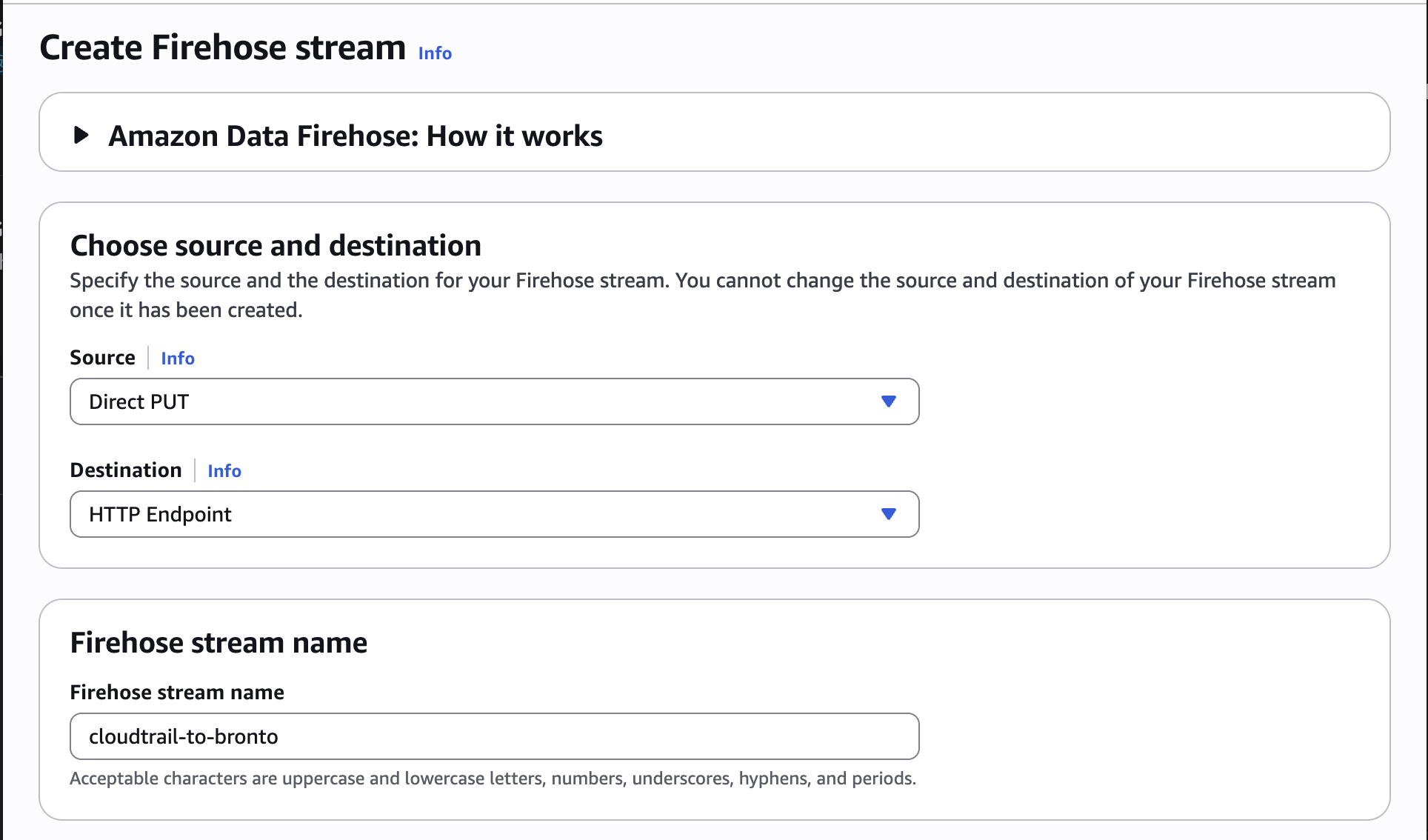
Under Destination settings:
- HTTP endpoint URL:
https://ingestion.<region>.bronto.io/aws/logs/(use the region your Bronto account is in — e.g.eu,us) - Authentication:
Use access key - Access key: your Bronto API key with the ingestion role
- Content encoding:
GZIP
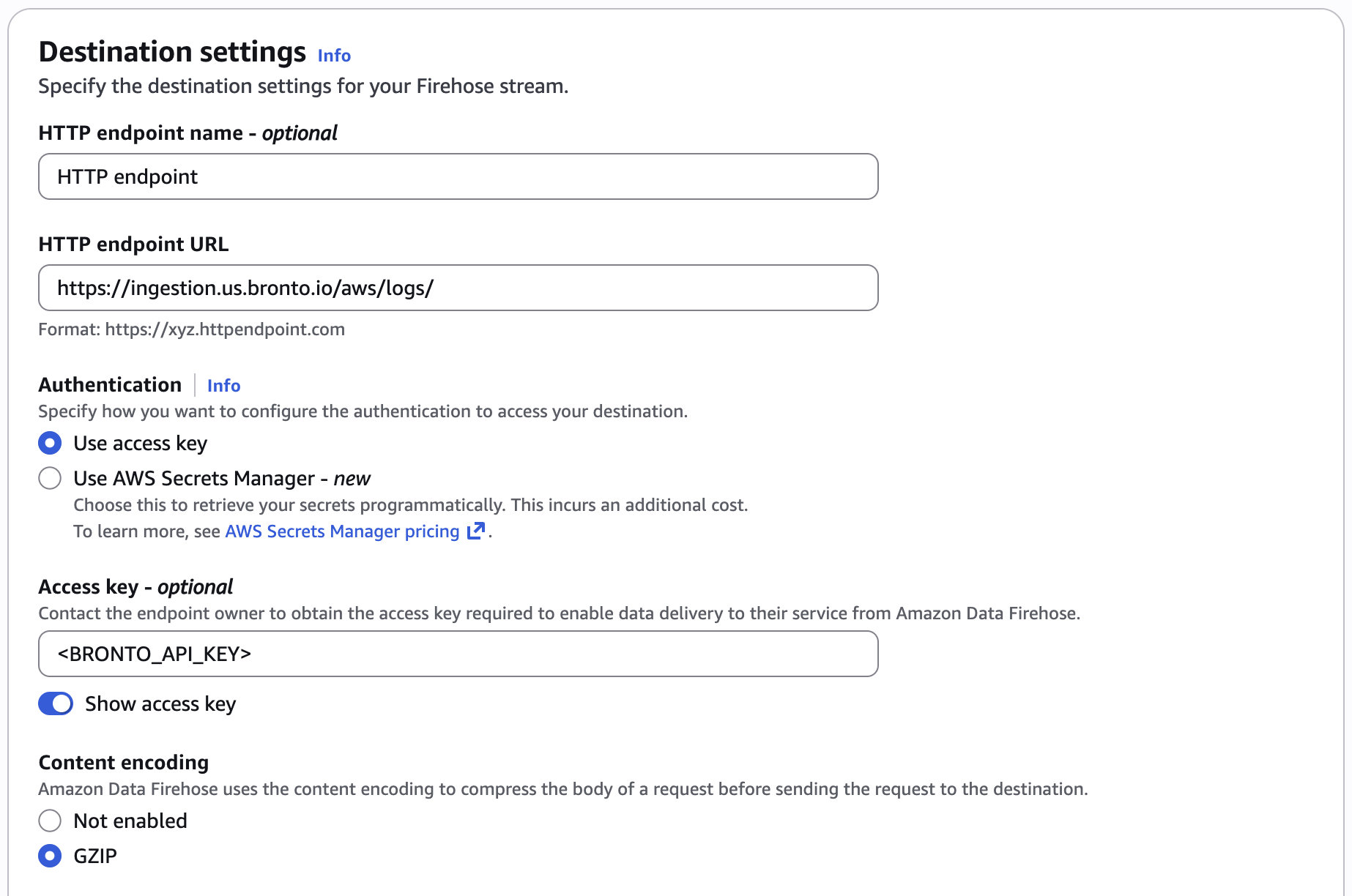
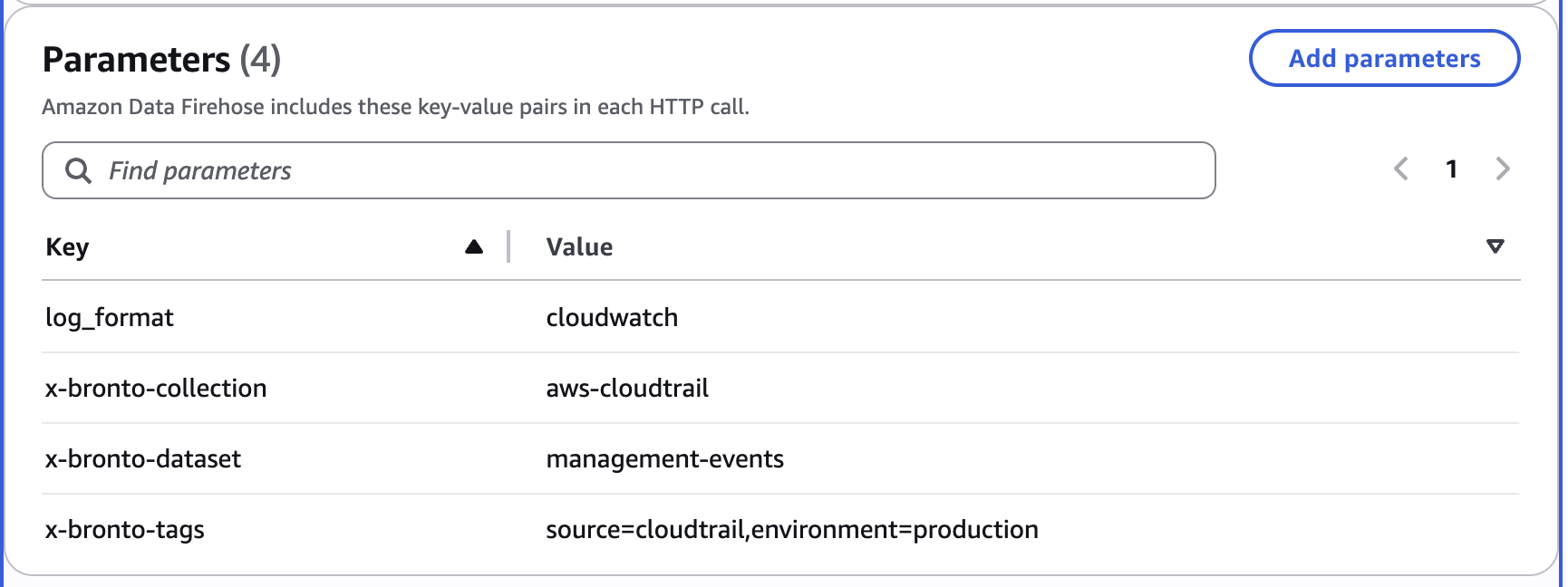
Scroll to the Parameters section and add four key/value pairs. Firehose sends these as HTTP headers on every call so Bronto knows how to route and parse the data.
| Key | Value | What it does |
|---|---|---|
log_format |
cloudwatch |
Critical. Tells Bronto the records are CloudWatch-Logs-wrapped (gzipped CloudWatch Logs envelope). Without it, Bronto stores opaque base64 blobs in records.N.data. With it, each log event becomes its own record with fields flattened to top level. |
x-bronto-collection |
aws-cloudtrail |
Routes data into this Bronto collection (created on first use). |
x-bronto-dataset |
management-events |
Names the dataset within the collection (created on first use). |
x-bronto-tags |
source=cloudtrail,environment=production |
Optional structured tags attached to the dataset. |
Why
log_format=cloudwatchmatters. Without it, each Bronto record carries one base64-encoded gzip blob inrecords.N.dataand you have to decode it yourself. With it, Bronto unwraps the CloudWatch Logs envelope server-side, parses the inner JSON, and emits one Bronto record per log event — witheventName,eventSource,userIdentity.arn, etc. as top-level searchable fields, plus envelope metadata under$logGroup,$logStream,$messageType,$owner.
- Buffer hints: defaults are fine (5 MiB / 300 s).
- Retry duration: 300 seconds (default).
- S3 backup: Firehose requires a backup bucket for HTTP endpoint destinations. Choose
Failed data onlyto keep storage cheap; pick or create a bucket dedicated to this stream. - IAM role: let Firehose create a new role, or supply an existing one with
s3:PutObjecton the backup bucket andlogs:PutLogEventsfor Firehose's own error log group.
Click Create Firehose stream.
Set this Firehose stream as the destination of your existing CloudWatch Logs subscription filter. Use an empty filter pattern ("") to forward every event from the log group.
Example CLI:
aws logs put-subscription-filter \
  --log-group-name /aws/cloudtrail/<your-trail> \
  --filter-name to-bronto-firehose \
  --filter-pattern "" \
  --destination-arn arn:aws:firehose:<region>:<account>:deliverystream/cloudtrail-to-bronto \
--role-arn arn:aws:iam::<account>:role/<cwl-to-firehose-role>After ~5–10 minutes (CloudWatch Logs delivery latency + Firehose buffer interval):
- The collection and dataset appear in Bronto on first ingest.
- Bronto search returns records with
eventName,eventSource,userIdentity.arn, etc. as top-level fields.
curl -G 'https://api.<region>.bronto.io/search' \
  --data-urlencode 'from=<log_id>' \
  --data-urlencode 'time_range=Last 15 minutes' \
-H "X-BRONTO-API-KEY: $BRONTO_API_KEY"The Bronto ingestion endpoint currently returns 200 OK with an empty body instead of the JSON response that the Firehose HTTP spec requires ({"requestId": "...", "timestamp": ...}).
Practical effects:
- Data does arrive in Bronto — confirmed by direct API queries against the Bronto search endpoint.
- AWS-side, Firehose treats every delivery as failed because the response doesn't validate. It retries for the full retry duration (300 s) and then writes the batch to the S3 backup bucket.
- CloudWatch metrics will show
DeliveryToHttpEndpoint.Successat 0% even when the pipeline is healthy.
Verify success by querying Bronto directly, not by reading Firehose metrics. Endpoint-side response-shape compliance and error semantics are being worked on; until they ship, expect the AWS dashboard to look more pessimistic than reality.