Adaptive Authorization & Runtime Guardrails for AI Coding Agents







Your AI coding agent can run rm -rf on your repo, leak your API keys, or get tricked by hidden instructions into leaking data on its own, with no undo. Doberman is the guard dog on the execution path. It stops the dangerous call before it runs.
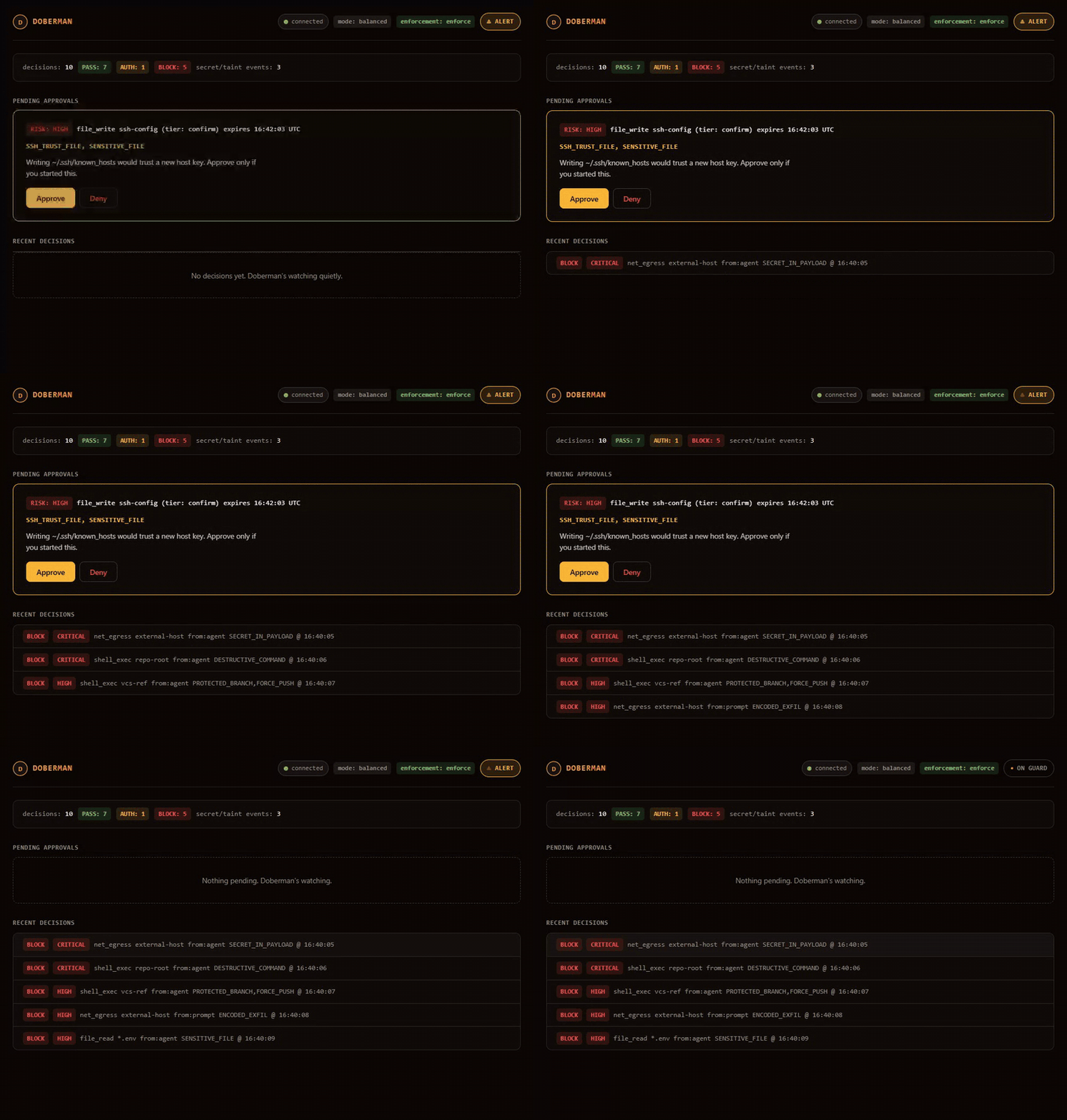
doberman demo against the live dashboard (doberman dash): five attacks blocked as they happen, then a human denies a high-risk approval.
A guardrail that isn't on the execution path can only advise.
Doberman sits between the agent and its tools, through a transparent MCP proxy or host hook (MCP: Model Context Protocol, the standard interface between an agent and its tools; a hook is code the host runs automatically around a tool call), and turns every action into an explicit, auditable decision. Every tool call gets exactly one verdict, decided before it runs:
| Verdict | What happens |
|---|---|
PASS |
Routine work, straight through, zero friction. |
AUTH |
Sensitive, paused for your approval. Repeat the exact same action within five minutes and it re-prompts with a one-click confirm (never for destructive work). |
BLOCK |
Dangerous, stopped cold. It never runs. |
AI agent ──▶ Doberman ──▶ real tools (files, shell, MCP servers, APIs)
                 └─ normalize → risk engine → PASS / AUTH / BLOCK
Works with Claude Code, Codex, OpenClaw, and any MCP-compatible agent. Cursor is guarded through its native hooks (experimental); other MCP clients connect through the MCP proxy. It's open source and local first, and it holds two guarantees: it fails closed (uncertainty denies the action) and it's raise-only (it can tighten automatically, but never silently loosens).
- Why Doberman: what it does, and its two guarantees
- Quick start: install and protect an agent in two commands
- Verify it end-to-end: watch it front a real MCP server
- Turn gate: the optional check that runs before the model even starts thinking
- Benchmark: attack-block rate vs. false positives (flagging something harmless)
- Write a guardrail plugin: register your own rule or audit sink
- Policy as code: a repo-committed
doberman.policy.yaml, reviewed like code - Tune to your risk tolerance: strictness modes and the enforcement dial
- Who is this for
- Roadmap
- Contributing · License
Most "AI guardrails" inspect prompts and offer advice after the model has already decided what to do. Doberman sits on the tool-execution path instead, so a blocked action never runs, no matter how it talked its way past the model's own guardrails first. Two properties make that a guarantee:
- Fail closed: any error, uncertainty, or unhandled case denies the action. There's no path to a
tool that goes around the decision engine. This includes silence: if nobody answers an approval
prompt, a hard deadline resolves it to a denial (2 minutes for the desktop dialog, 10 minutes as the
backstop for the whole approval flow), logged distinctly as
timeoutrather thandenied. A hung prompt is not a denial on its own, and agents usually run unattended, so that deadline matters. - Raise-only learning: guardrails and adaptive learning can tighten automatically, but never silently loosen. Every permanent policy weakening needs explicit, audited human approval, gated behind a possession factor: proof you hold something specific, such as TOTP (a time-based one-time code from an authenticator app) if you've enrolled one, or otherwise the local Doberman password.
The parity matrix maps each protection to each host Doberman fronts: Claude Code, Codex, the MCP proxy, and OpenClaw. Every checkmark links to the CI test that proves it. Open cells are contributor-sized work, and the matrix regenerates from those tests on every build, so it can't drift from what's actually proven.
Doberman guards any MCP-compatible coding agent: pick your agent, run one command, and every tool call is reviewed before it executes. The full walkthrough (every option and flag, the dashboard, health checks) is the Setup guide.
pip install doberman-coreAfter installing, run doberman --install-completion to enable shell tab completion.
Note Run
doberman uninstall --globalto remove Doberman from the whole machine. It removes the writable Claude Code and Codex hooks, project and device state, and enrolled factors before it removes thedoberman-corepackage with pip or pipx. Uninstalling the package first leaves hooks pointing at a missing binary. Already hit this? Reinstalldoberman-core, then run the global uninstall.doberman doctorflags any hook entry whosedobermanis not on PATH. More recovery steps: Recover.
- Install integrity:
install-hooksrecords a keyed fingerprint (a short tag derived from a secret key, so the original value can't be worked out from it) of Doberman's own hook entries, in your per-user Doberman config directory, never in the repo. If those entries are later stripped or altered, the next hook invocation that still runs warns about it, anddoberman doctorreports which scope diverged. This is detection only; it never blocks. (#239)
| Your agent | How Doberman plugs in | Get started |
|---|---|---|
| Claude Code | Hooks: gates every built-in and MCP tool call (recommended) | doberman setup → guide |
| Codex CLI | Native PreToolUse hook (experimental) | doberman install-hooks --host codex |
| Claude Desktop / Cursor | MCP proxy: wraps your tool server | doberman serve -- <your-server> → guide |
| OpenClaw | Native plugin adapter | guide · adapter |
| Cursor | Native hooks adapter (experimental) | doberman install-hooks --host cursor · adapter |
| Any MCP-compatible agent | MCP proxy | guide |
Fastest path (Claude Code):
doberman setup # asks which agents to guard, then picks a strictness mode, tunes guardrails, wires themAnonymous usage counts are on by default: command names and daily totals, never paths, prompts, or
secrets. The first command prints a notice, and doberman telemetry off or DO_NOT_TRACK=1 turns
them off. See Telemetry.
Doberman now reviews every tool call your agent makes. Confirm it with doberman doctor, or watch
real verdicts with doberman demo. MCP-proxy wiring, the dashboard, the TUI, scan, and 2FA
(two-factor authentication) are in the Setup guide. Pending-approval cards in the
dashboard can copy their already-redacted decision details as JSON for review handoffs without
exposing raw targets or paths.
Terminal explanations wrap to 60–78 columns. Paths and URLs remain intact, while other overlong tokens are split to stay within the configured width.
Two ways to watch Doberman front a real MCP server, with no in-process test doubles (fakes standing in for real components) anywhere in the chain.
Interactive demo (MCP Inspector and a real filesystem server):
npx -y @modelcontextprotocol/inspector doberman serve -- npx -y @modelcontextprotocol/server-filesystem ~/my-projectOpen the Inspector UI and call tools through Doberman: routine reads and writes pass straight through to the real filesystem server; a destructive call comes back as a policy error and never executes.
End-to-end test (in a dev checkout):
pytest tests/integration/test_serve_end_to_end.py -qThis spawns doberman serve as a real subprocess in front of a real stdio (standard input/output)
tool server (tests/fixtures/stdio_tool_server.py). It
connects to that subprocess with a real MCP client playing the agent, and checks the whole chain
over actual stdio: the downstream server's tools are re-exposed through the proxy, a PASS verdict
reaches the tool and the downstream's call log records it, and a BLOCK verdict (rm -rf /) never
reaches it, so the call log stays empty. That last check is the core guarantee the whole project
depends on: a blocked action never runs.
Note The rest of the integration suite deliberately uses an in-process fake downstream (
tests/fixtures/fake_tool_server.py) that records every call it executes, so the tests can prove a blocked action reached nothing. It's a test fixture, not the runtime.doberman servealways talks to the real server: the one it spawns from the command after--, or the remote one you point it at with--url.
Doberman's proxy speaks MCP at the version pinned in pyproject.toml (mcp>=1.27,<2). Its cross-call
protections (the taint ledger, a record of values that came from an untrusted source; read-vs-send
fingerprints; and the decision log) key off repo-local identity, never the protocol session, and are
regression-tested to stay stateless.
Operators can bound how many decision rows are kept with doberman decision-log-prune. It deletes
only resolved decisions, never pending AUTH rows or the append-only policy-change ledger. See the
CLI reference for the age and row-budget options.
This is a second point where the same decision engine gets consulted: a host hook that runs on the user's turn (the prompt, plus anything attached, pasted, or fetched by a tool) before the model starts inferring, generating its response. That means a blatant attack in the turn gets judged before it costs a single token (a chunk of text the model processes) of inference.
The turn gate is an efficiency and early-warning layer with a deliberately narrow guarantee: no turn matching a Tier-0 signature (a known, deterministic prompt-injection pattern) reaches the model. The action gate described above remains the real safety guarantee: an attacker who slips past the turn gate still has to get past it. Full mechanism, module map, and invariants: Turn gate.
A suite-agnostic harness (one that works with more than one benchmark suite) scores Doberman as a filter over labeled actions, and reports two numbers: the attack bypass rate and the benign over-block rate, how often something harmless gets flagged anyway. It runs the real decision engine over each labeled tool call, so the result is deterministic and needs no network access.
A labeled detection corpus turns this into a per-category detection-quality measurement, and CI gates on any regression. Three more operator-supplied external suites (RedCode-Exec, MSB, and LLMail-Inject) are wired in the same way, alongside AgentDojo. Commands, methodology, and published results are in Benchmarks.
Third-party rules register through the doberman.rules entry point (a Python packaging mechanism
that lets one package register a plugin for another to discover, without either importing the other
by name). Core never imports your package by name, and nothing loads until you opt in with
doberman plugins enable <name>. A five-minute worked example lives at
examples/plugin-guardrail/. The same entry-point pattern
(doberman.audit_sinks) forwards the redacted audit log to your own pipeline, for example a webhook.
Full walkthrough: Write a guardrail plugin.
Commit a doberman.policy.yaml file at the repo root, and its blocked/sensitive globs (wildcard
file patterns) fold into every action decision alongside the local role. That way, a team reviews
policy changes in the same PR as the code they govern, instead of relying on a teammate's local
.doberman/ state:
version: 1            # optional; if present must be 1
blocked: ["secrets/**", "*.pem"]
sensitive: ["infra/**"]
This file is raise-only too. If a new version drops a glob the last-approved version enforced,
that never silently loosens what's blocked or sensitive. The stricter set stays pinned locally
(.doberman/policy_file_pin.json) and stays in force until a human runs doberman policy-file --accept, gated behind the same possession factor (2FA if enrolled, else the local password) as
every other weakening. Running doberman policy-file with no flag shows what's currently applied
and what's pending. A file placed under .doberman/ instead of the repo root is ignored: this is
git-reviewed policy, not local state.
Doberman ships with sane defaults, but every dial is yours to move: the strictness mode
(Light/Balanced/Strict/Paranoid), the enforcement dial (enforce/monitor/off), the opt-in default
role, the subjective prefs weights, tune's friction telemetry, and message-tone. Lowering any
of them requires a possession factor (TOTP if enrolled, otherwise the local Doberman password) and
gets recorded in the append-only policy-change ledger. Raising one is always frictionless. Full
reference: Tune to your risk tolerance.
Recovering from sticky taint, re-approving a changed tool, resetting learned memory, or fully removing a project: see Recover.
You can also warm a fresh install's baseline (its record of what counts as normal behavior) from
your own already-allowed traces instead of starting cold: doberman memory seed --from traces.jsonl (format and invariants).
- Developers running AI coding agents who want autonomous agents without
rm -rfroulette. - Security engineers evaluating AI agent security, MCP security, LLM tool-use sandboxing, and zero-trust architectures for agentic AI.
- Platform teams deploying agent fleets who need policy enforcement, audit logs, and human-in-the-loop approval for destructive actions.
See the roadmap for what's planned and in flight, the GitHub board for day-to-day tracking, and the changelog for what has already shipped.
Start with CONTRIBUTING.md for local setup, CI checks, project invariants, and the PR workflow.
CI also runs python scripts/check_markdown_links.py, a deterministic offline check for
repository-local Markdown links and heading anchors. It skips external URLs and fenced code blocks
and never makes network requests.
Come say hi. Questions, ideas, a rule pack to share, or an attack you caught in the wild? Join the pack on Discord →. It's where the roadmap gets shaped.
Found a vulnerability or a way around a guardrail? Please report it privately: see SECURITY.md. Don't open a public issue or Discord post for a security report.
Apache-2.0. The core is standalone: it has no proprietary dependency, and CI enforces that. Each release also ships a CycloneDX SBOM (software bill of materials, a full list of a build's dependencies) listing the exact dependency set. See SECURITY.md.