




Electricity for Low-carbon Integration and eXchange of Resources (EL1XR)
el1xr_opt is the core optimisation engine of the EL1XR-dev ecosystem. It provides a powerful and flexible modelling framework for designing and analysing integrated, zero-carbon energy systems, with support for electricity, heat, hydrogen, and energy storage technologies.
- Documentation via ReadTheDocs.
- Modular formulation for multi-vector energy systems
- Flexible temporal structure: hours, days, representative periods
- CSV or DuckDB input: read a case from a CSV folder or a single
.duckdbfile (same results either way) - DuckDB output: results are written to
results.duckdbby default, with CSV output available on request - Built on Pyomo
- Monolithic or Benders decomposition solve: split the investment/operating problem by scenario or by time window (storage inventory and the peak-demand threshold carried in the master), validated to match the monolithic optimum
- Interfaces with
EL1XR-data(datasets) andEL1XR-examples(notebooks)
el1xr_opt reads a case from either a CSV folder or a single .duckdb file
through one common interface, builds a Pyomo model (electricity, hydrogen and a
behind-the-meter heat sector), solves it, and writes the results back to DuckDB.
Because both inputs are read the same way, a DuckDB run reproduces a CSV run
exactly.
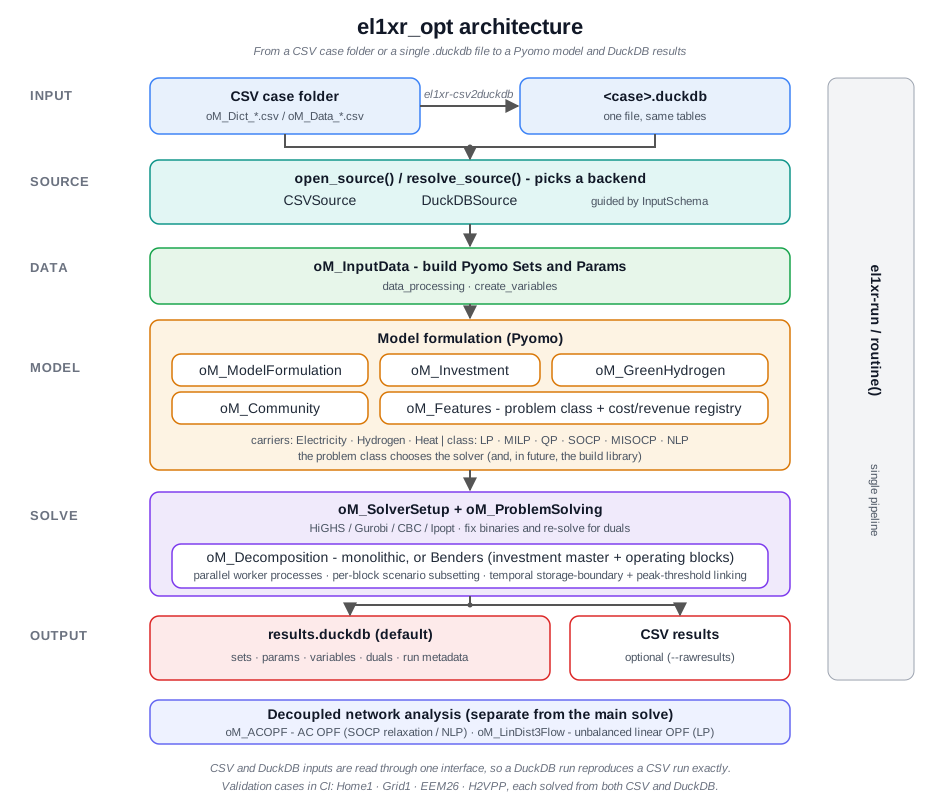
src/: Core source code for the optimisation model.data/: Sample case studies.docs/: Documentation and formulation notes.tests/: Validation and regression tests.
- Python 3.11 or higher.
- A supported solver: HiGHS, Gurobi, CBC, or CPLEX. The recommended solvers can be installed automatically using the command below.
There are two ways to install el1xr_opt:
Option 1: Install from PyPI (Recommended)
- Install the package from PyPI:
pip install el1xr_opt- Install the required solvers:
el1xr-install-solversOption 2: Install from Source (for Developers)
If you want to work with the latest development version or contribute to the project, you can install it from the source:
- Clone the repository:
git clone https://github.com/EL1XR-dev/el1xr_opt.git
cd el1xr_opt- Create and activate a virtual environment (recommended):
python -m venv venv
source venv/bin/activate # On Windows use `venv\Scripts\activate`- Install the package in editable mode, which also installs the necessary dependencies:
pip install -e .- Install the required solvers:
el1xr-install-solversRun the included Home1 example case with the following command from the root directory:
el1xr-run --case Home1 --solver highsThis will run the optimisation and save the results in the src/el1xr_opt/Home1/Results directory.
To run the optimisation model, use the el1xr-run command. If you run the script without arguments, it will prompt you for them interactively. Moreover, the model can be executed with explicit information as follows:
python -m el1xr_opt --dir <folder_parent_case> --case <case_folder_name> --solver <solver_name> --date <date_string> --rawresults <'Yes'-or-'No'> --plots <'Yes'-or-'No'>For example:
python -m el1xr_opt --dir data --case Home1 --solver highs --date "2025-09-30 20:26:00" --rawresults No --plots NoCommand-line Arguments
--dir: Directory containing the case data. For the sample cases, this would be src/el1xr_opt.--case: Name of the case to run (e.g.,Home1). Defaults to Home1.--solver: Solver to use (e.g.,highs,gurobi,cbc,cplex). Defaults to highs.--date: Model run date in "YYYY-MM-DD HH:MM:SS" format. Defaults to the current time.--rawresults: Also save raw results as CSV (True/False). Defaults to False.--plots: Generate plots (True/False). Defaults to False.--duckdbresults: Save results toresults.duckdb(True/False). Defaults to True.
A case can be supplied as a folder of CSV files (the historical layout) or as a
single .duckdb file holding the same tables. Convert a CSV case to DuckDB
with:
el1xr-csv2duckdb --dir data/EEM26 --case Home1This writes data/EEM26/Home1.duckdb. Run the model the same way on either
input:
el1xr-run --dir data/EEM26 --case Home1 --solver highsIf both the CSV folder and the .duckdb file are present, the CSV folder is
used; the DuckDB file is used when the folder is absent.
Results are written to <case>/results.duckdb by default (one table per set,
parameter, variable and constraint dual, plus a oM_Result_RunMetadata
table). Pass --rawresults Yes to also write the CSV result tables.
Small validation cases for sizing, tariffs and frequency-market participation
are generated on the fly from the H2VPP base case by
data/sizing/make_sizing_cases.py (read as .duckdb input); see
data/sizing/README.md.
Contributions are welcome! If you want to contribute to el1xr_opt, please follow these steps:
- Fork the repository.
- Create a new branch for your feature or bug fix.
- Make your changes and commit them with a clear message.
- Push your changes to your fork.
- Create a pull request to the
mainbranch of this repository.
This project is licensed under the terms of the GNU General Public License v3.0.