Lightweight theme support for Python curses applications


Inspired by FlossWare curses-java, this library brings professional theme support to Python's standard curses module with zero external dependencies.
- 🎨 10 Built-in Themes: Modern, classic IDE, and retro computer themes
- 🔌 Pluggable Architecture: Easy custom theme creation
- 🎯 Semantic Colors:
primary,success,error,warning,info - 🔄 Runtime Theme Switching: Change themes on-the-fly
- 🖥️ Terminal Aware: Auto-detects 8/16/256 color support with fallbacks
- 📦 Zero Dependencies: Only uses Python standard library
curses - 🧪 Thoroughly Tested: Comprehensive test coverage
- 📚 Well Documented: API reference, examples, and guides
#!/usr/bin/env python3
import curses
from curses_themes import ThemeManager

def main(stdscr):
    # Load and apply a theme
    theme = ThemeManager.load('dark')
    theme.apply(stdscr)  # REQUIRED before using colors

    # Semantic colors - general-purpose coloring by intent
    stdscr.addstr(0, 0, "Success!", curses.color_pair(theme.colors.success))
    stdscr.addstr(1, 0, "Error!", curses.color_pair(theme.colors.error))
    stdscr.addstr(2, 0, "Warning!", curses.color_pair(theme.colors.warning))

    # Component colors - UI widget styling
    stdscr.addstr(3, 0, "[ Save ]", curses.color_pair(theme.components.button))

    # Draw themed boxes
    theme.draw_box(stdscr, 5, 2, 10, 40, title="My Panel")

    stdscr.refresh()
    stdscr.getch()

if __name__ == "__main__":
curses.wrapper(main)Important: You must call theme.apply(stdscr) before accessing theme.colors or theme.components, or a RuntimeError is raised. Color attributes return integers that must be wrapped with curses.color_pair() when used with curses display functions. See the API Documentation for details.
pip install curses-themesOr install from source:
git clone https://github.com/FlossWare/curses-themes.git
cd curses-themes
pip install -e .Python on Windows doesn't include the curses module. Install with Windows support:
pip install curses-themes[windows]Or install windows-curses separately:
pip install windows-cursesUse Windows Terminal for best color support.
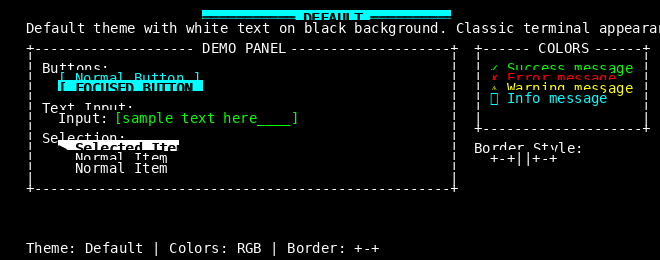 Default Classic terminal aesthetic Timeless |
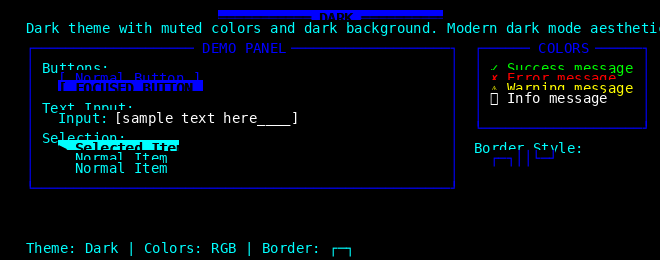 Dark Professional dark mode Modern |
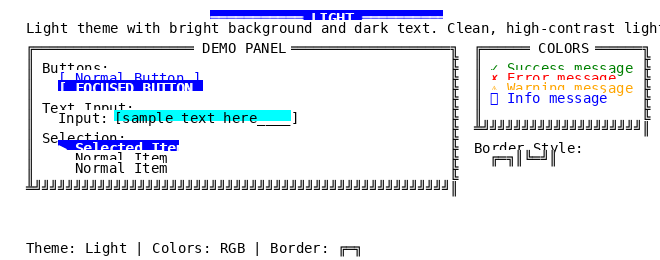 Light High contrast for bright environments Modern |
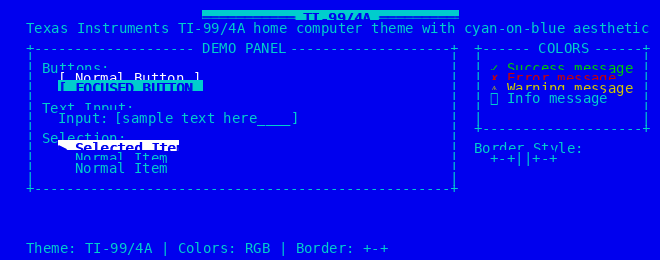 TI-99/4A Texas Instruments home computer 1981-1984 |
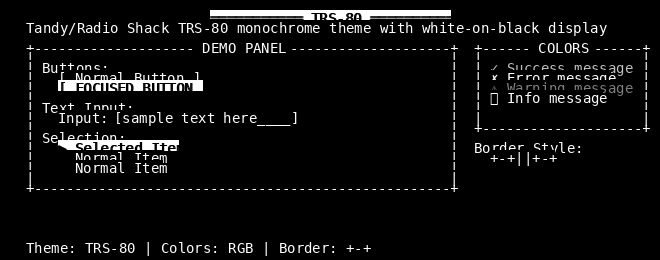 TRS-80 Tandy/Radio Shack monochrome 1980-1983 |
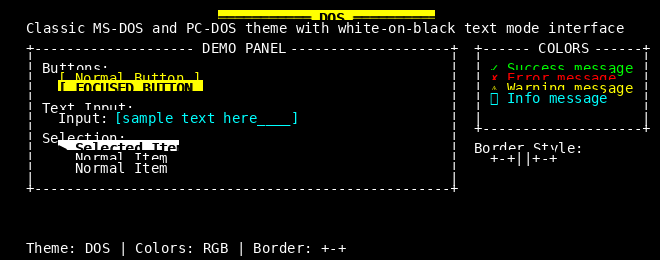 DOS Classic MS-DOS interface 1981-1995 |
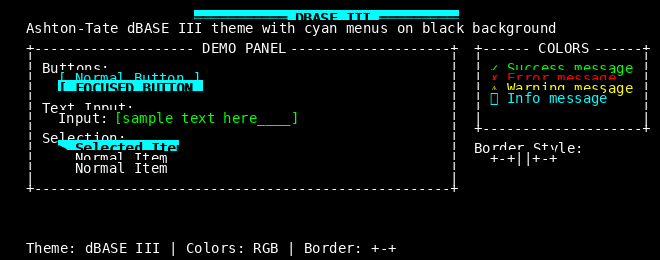 dBASE III Iconic database software 1984-1985 |
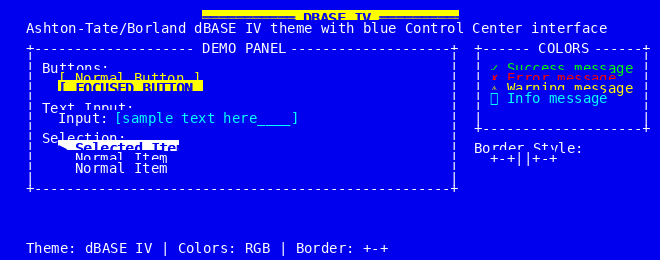 dBASE IV Windowed database interface 1988-1993 |
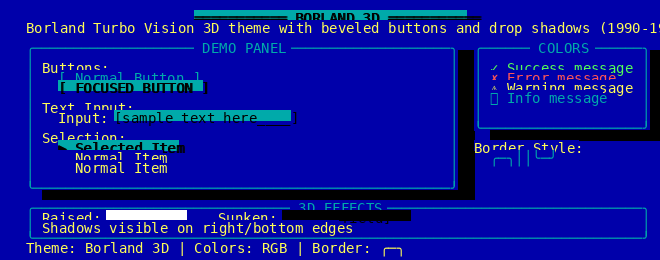 Borland 3D Turbo Vision 3D look 1990-1997 |
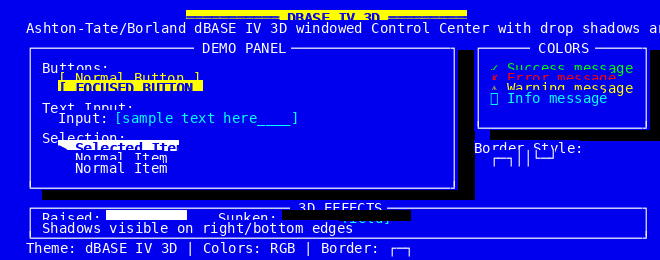 dBASE IV 3D 3D windowed database UI 1988-1993 |
| Theme | Era | Style | Colors | Best For |
|---|---|---|---|---|
| Default | Timeless | Minimal | B/W | Universal compatibility |
| Dark | Modern | Professional | Blues/Greens | Low-light coding |
| Light | Modern | Clean | High contrast | Bright environments |
| TI-99/4A | 1981-1984 | Retro | Cyan/Blue | Nostalgia, gaming UIs |
| TRS-80 | 1980-1983 | Monochrome | White/Black | Authentic retro feel |
| DOS | 1981-1995 | Classic | White/Yellow | System utilities |
| dBASE III | 1984-1985 | Business | Cyan menus | Database applications |
| dBASE IV | 1988-1993 | Windowed | Blue background | Modern database UIs |
| Borland 3D | 1990-1997 | 3D Effect | Gray/Blue shadows | IDE-style applications |
| dBASE IV 3D | 1988-1993 | 3D Windowed | Blue with depth | Sophisticated database UIs |
from curses_themes import Theme, ThemeManager

class SolarizedTheme(Theme):
    """Solarized Dark theme using declarative class attributes."""
    color_map = {
        'background': (0, 43, 54),
        'foreground': (131, 148, 150),
        'primary': (38, 139, 210),
        'success': (133, 153, 0),
        'error': (220, 50, 47),
        'warning': (181, 137, 0),
        'info': (42, 161, 152),
        'accent': (211, 54, 130),
    }
    component_colors = {
        'background': ((131, 148, 150), (0, 43, 54)),
        'button': ((38, 139, 210), (0, 43, 54)),
        'button_focused': ((0, 43, 54), (38, 139, 210)),
        'border': ((131, 148, 150), (0, 43, 54)),
    }
    border_chars = "┌─┐││└─┘"

    def __init__(self):
        super().__init__(
            name="Solarized Dark",
            description="Precision colors for machines and people",
            author="Ethan Schoonover",
        )

ThemeManager.register(SolarizedTheme)
theme = ThemeManager.load('solarized-dark')
Or create a theme without subclassing:
theme = ThemeManager.create(
    "Quick Theme",
    color_map={
        'background': (0, 0, 0), 'foreground': (255, 255, 255),
        'primary': (0, 120, 215), 'success': (16, 124, 16),
        'error': (232, 17, 35), 'warning': (193, 156, 0),
        'info': (0, 120, 212), 'accent': (142, 68, 173),
    },
)import curses
from curses_themes import ThemeManager
def main(stdscr):
themes = ['default', 'dark', 'light', 'borland-3d', 'dbase-iii']
current = 0
while True:
theme = ThemeManager.load(themes[current])
theme.apply(stdscr)
stdscr.clear()
stdscr.addstr(0, 0, f"Theme: {themes[current]}",
curses.color_pair(theme.colors.primary))
stdscr.addstr(2, 0, "Press 'n' for next, 'q' to quit")
key = stdscr.getch()
if key == ord('q'):
break
elif key == ord('n'):
current = (current + 1) % len(themes)
curses.wrapper(main)ThemeManager.load(name)- Load theme by nameThemeManager.register(theme_class, name=None)- Register custom themeThemeManager.list_themes()- List available themes
theme.apply(stdscr)- Apply theme to screen (must call before using colors)theme.draw_box(stdscr, y, x, height, width, title="")- Draw themed box
General-purpose coloring by intent:
theme.colors.primary- Main UI highlightstheme.colors.success- Positive feedbacktheme.colors.error- Error messagestheme.colors.warning- Caution messagestheme.colors.info- Informational messagestheme.colors.accent- Secondary highlightstheme.colors.background- Default backgroundtheme.colors.foreground- Default text
UI widget styling:
theme.components.background- Default backgroundtheme.components.button- Normal buttontheme.components.button_focused- Focused buttontheme.components.text_input- Input fieldstheme.components.border- Borders and framestheme.components.selection- Selected itemstheme.components.disabled- Disabled elements
See the examples/ directory for complete demonstrations:
basic_usage.py- Simple theme demonstrationtheme_switcher.py- Interactive theme switchingcustom_theme.py- Creating custom themesconfig_theme_demo.py- Loading themes from config files
Contributions welcome! See CONTRIBUTING.md for guidelines.
- Create theme class in
curses_themes/themes/your_theme.py - Define
color_mapandcomponent_colorsclass attributes - Optionally set
border_chars(8-character string: TL, T, TR, L, R, BL, B, BR) - Add tests in
tests/test_themes/test_your_theme.py - Submit pull request
- curses-java - Java terminal UI library with themes (inspiration for this project)
- Textual - Modern Python TUI framework
- Rich - Rich terminal output library
MIT - See LICENSE file for details.
FlossWare - https://github.com/FlossWare
Inspired by the excellent curses-java library.