
Show uncommited, untracked and unpushed changes in multiple Git repositories.
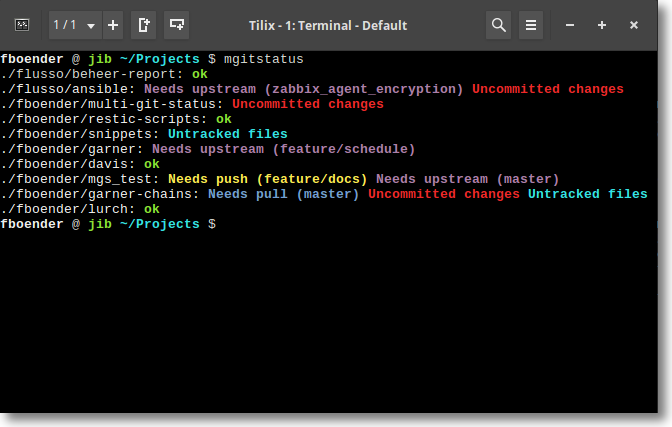
multi-git-status shows:
- Needs push(BRANCH) if the branch is tracking a remote branch which is behind. If there are branches with no remote, this status is also shown since the branch might be new and unpushed. This is even true for branches with no new commits.
- Needs pull(BRANCH) if the branch is tracking a remote branch which is
ahead. This requires that the local git repo already knows about the remote
changes (i.e. you've done a
fetch). It does NOT contact the remote. - Uncomitted changes if there are unstaged or uncommitted changes on the checked out branch.
- Untracked files if there are untracked files which are not ignored.
Since there are a lot of different states a git repository can be in, multi-git-status makes no guarantees that all states are taken into account. For example, multi-git-status does not look at stashes.
Usage: mgitstatus <DIR> [DEPTH=2]

Scan for .git dirs under DIR (up to DEPTH dirs deep) and show git status
The following example scans all directories under the current dir, with a depth of 2. That means the current dir and all directories directly under it.
~/Projects/fboender $ mgitstatus
./multi-git-status: ok
./mdpreview: ok
./snippets: ok
./boxes: ok
./ansible-cmdb: Uncommitted changes Untracked files
./scriptform: Uncommitted changes
To scan deeper:
~/Projects $ mgitstatus . 3
./megacorp/ansible: ok
./megacorp/monitoring: ok
./fboender/multi-git-status: ok
./fboender/mdpreview: ok
./fboender/snippets: ok
./fboender/boxes: ok
./fboender/ansible-cmdb: Uncommitted changes Untracked files
./fboender/scriptform: Uncommitted changes
./fboender/startpage: ok
- Clone this git repo
- Copy
mgitstatussomewhere in your PATH
multi-git-status is released under the MIT license.