Open-source Windows desktop client for syncing a remote catalog, checking releases, and downloading packaged files through a single launcher UI.
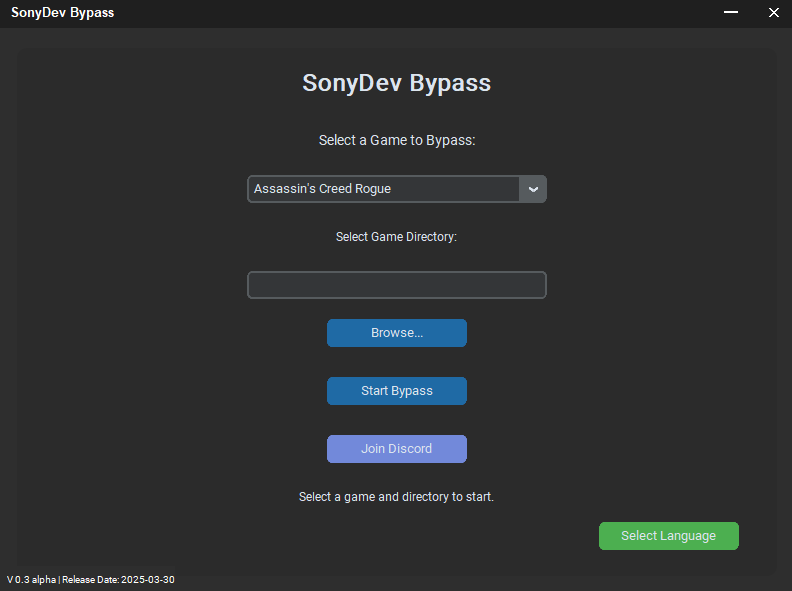
- The current WPF/.NET 8 desktop application
- Release packaging scripts for Velopack and Inno Setup
- A safe public source drop with no production API secrets
- Documentation for self-hosting the catalog and update endpoints
This repository does not include:
- production
X-Secret-Keyvalues - private server credentials
- live infrastructure secrets
- internal-only test releases
The source code is published so users can inspect the application, verify what it does, and contribute improvements. The official production backend is not bundled here. To run the app against your own infrastructure, create a local runtime config from sonydev.runtime.example.json.
- .NET 8
- WPF
- Velopack for update packaging
- Inno Setup for the wrapper installer
SonyDevBypass.App- main desktop applicationInstaller- Inno Setup wrapper and helper scriptsReleases- release metadata such aslatest.jsondocs/self-hosting- example deployment and backend notes
- .NET 8 SDK
- Velopack CLI:
dotnet tool update -g vpk --version 0.0.1298 - Inno Setup 6 if you want to build the installer wrapper
Copy sonydev.runtime.example.json to sonydev.runtime.json and replace the placeholder endpoints with your own.
The file is intentionally ignored by git.
Release builds do not auto-bundle your local sonydev.runtime.json, so copy it next to the published app only when you explicitly intend to ship that config.
dotnet build .\SonyDevBypass.slndotnet publish .\SonyDevBypass.App\SonyDevBypass.App.csproj `
-c Release `
-r win-x64 `
--self-contained true `
-o .\artifacts\publishIf you want the published app to target a real backend, copy an explicit runtime file into the publish folder yourself, for example Copy-Item .\sonydev.runtime.json .\artifacts\publish\sonydev.runtime.json. This is now a manual step on purpose.
The app reads runtime settings from sonydev.runtime.json. It also supports these environment variables:
SONYDEV_RUNTIME_CONFIGSONYDEV_CATALOG_API_URLSONYDEV_GAMES_BASE_URLSONYDEV_UPDATES_BASE_URLSONYDEV_SECRET_KEYSONYDEV_PACKAGE_IDSONYDEV_PACKAGE_TITLESONYDEV_UPDATE_CHANNELSONYDEV_INSTALL_DIRSONYDEV_OFFICIAL_WEBSITE
Default values in the public repository point to example.invalid on purpose so the open-source build cannot accidentally target private infrastructure.
For public open-source releases, do not ship a real shared secret in the client runtime config. Prefer a public read-only catalog/update endpoint or a real per-user server-side auth flow.
The app expects:
- a catalog endpoint exposed either through
catalog_api_urlor a legacy directory listing undergames_base_url - an update endpoint that serves
latest.json, Velopack metadata, and setup packages - optional header-based protection if you want to require a shared secret
Start with:
vpk pack `
  --outputDir .\Releases `
  --channel win-x64-beta `
  --runtime win-x64 `
  --packId SonyDevBypass `
  --packVersion 1.2.6-beta `
  --packDir .\artifacts\publish `
  --mainExe SonyDevBypass.exe `
  --packTitle "SonyDev Bypass" `
  --packAuthors "SonyDev" `
--icon .\SonyDevBypass.App\Assets\icon.icopowershell -ExecutionPolicy Bypass -File .\Installer\build-inno.ps1If you want Windows metadata patched on the published executable, place rcedit-x64.exe into Installer before running Installer/patch-apphost-metadata.ps1.
Source code in this repository is released under GPL-3.0-or-later. See LICENSE.
Brand names, logos, icons, and official project identity are handled separately. If you redistribute a modified build, keep the copyright and license notices, mark your changes, and do not present the result as an official SonyDev release.
Relevant files:
- Contribution guide:
CONTRIBUTING.md - Security reporting:
SECURITY.md
- Website: sonydev.de
- Releases: github.com/SonyDew/SonyDev-Bypass/releases
- Issues: github.com/SonyDew/SonyDev-Bypass/issues