


An end-to-end ROS 2 Humble autonomous warehouse robotics system featuring Gazebo Ignition simulation, Nav2 autonomous navigation, a 2-DOF active vision QR/barcode scanner, inventory verification, gamepad teleoperation, autonomous delivery dispatching, and web-based management dashboards.
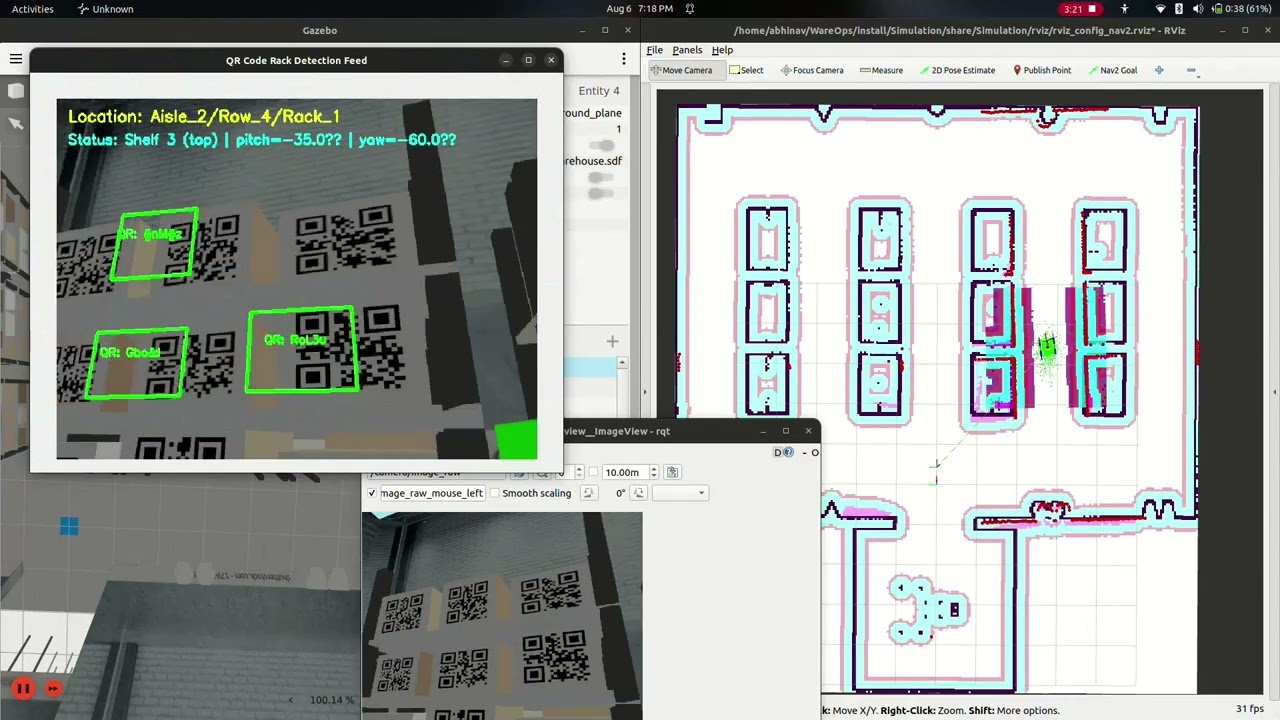
🎬 Watch the full video demonstration on YouTube: WareOps Bot Simulation Video
- 🤖 Mobile Robot Simulation: Differential drive robot with a 2-DOF active camera mast (Yaw pan + Pitch tilt) spawned in a multi-aisle warehouse environment (
warehouse.sdf). - 🗺️ Nav2 Autonomous Navigation: Integrated AMCL localization, static occupancy grid mapping (
New_map.pgm), costmaps, and path planning for precise rack-to-rack transit. - 🚀 Unified System Launch Orchestration (
wareops_system_launch): Centralized ROS 2 launch package with delayed initial pose estimation, automatic browser tab launcher, and multi-node lifecycle synchronization. - 👁️ Active Vision Rack Scanning: Dual-engine vision pipeline (OpenCV WeChat QR + standard barcode decoders) with automated vertical and horizontal gimbal sweeps across 4-tier warehouse racks.
- 📦 Automated Stock Audit & Logging: Compares scanned QR codes with ground-truth inventory database (
warehouse_database.xlsx), generating verified inventory reports (scanned_inventory.csv) and error logs (mismatch_log.csv). - 🌐 Two Web Dashboard Suites:
- Stock Navigation & Inventory Audit Web Dashboard (
warehouse_stock_navigation_bot): Real-time camera overlay, interactive layout map, product search catalog, and one-click "Full Warehouse Detection" tour trigger. - Autonomous Delivery & Teleop Web Dashboard (
scripts/web_dashboard.py): Interactive 2D facility map with corner positions (NW, NE, SW, SE) and waypoints, real-time/delivery_statusand/deliveredevent logging, virtual teleop joystick, and camera gimbal pan/tilt sliders.
- Stock Navigation & Inventory Audit Web Dashboard (
- 🎮 Joystick Teleoperation: Dual-stick controller driving, speed scaling, camera angle adjustments, and one-touch target triggers.
- 🔄 Autonomous Tour & Dispatch Scripts:
scripts_1/full_tour.py: Master automated warehouse inspection tour that sequentially visits all target racks, commands gimbal sweeps, waits for verification completion, and returns home.scripts/: Modular navigation scripts for targeted positions (Rack R4 A3, R4 A2, R3 B3), corner locations (NE, SE), waypoints (Alpha, Beta), and home docking.
WareOps/
└── src/
    ├── wareops_system_launch/                  # Centralized System Launch Orchestration
    │   ├── launch/
    │   │   ├── full_system.launch.py           # Full system: Gazebo + Nav2 + Teleop + Scanner + Stock Web Dashboard
    │   │   └── robot_webcontroller.launch.py   # Simulation + Nav2 + Delivery & Teleop Web Dashboard
    │   ├── package.xml
    │   └── setup.py
    │
    ├── Simulation/                             # Gazebo environment, URDFs, Nav2 config, RViz
    │   ├── config/                             # Nav2, SLAM, and Gazebo bridge parameters
    │   ├── launch/                             # Core simulation launch files (display_navigation.launch.xml)
    │   ├── maps/                               # Warehouse 2D occupancy grid maps (New_map.pgm / New_map.yaml)
    │   ├── rviz/                               # Custom RViz2 display profiles
    │   ├── urdf/                               # Robot Xacro model with 2-DOF camera mast
    │   └── world/                              # Warehouse SDF world model with QR racks
    │
    ├── active_vision_scanner_simulation/       # Autonomous Active Vision Scanner Node
    │   ├── active_vision_scanner_simulation/   # Multi-candidate vision pipeline & state machine
    │   └── launch/                             # Active scanner launch configuration (scanner_system.launch.py)
    │
    ├── joy_teleop_simulation/                  # Gamepad / Controller Teleop Node
    │   ├── joy_teleop_simulation/              # Axis/button velocity & gimbal command mapper
    │   └── launch/                             # Teleop launch configuration (teleop_sim.launch.py)
    │
    ├── Warehouse_stock_navigation_bot/         # Inventory Database & Stock Web Dashboard Server
    │   ├── warehouse_stock_navigation_bot/     # Flask web app & stock navigator node
    │   └── config/                             # Map assets (New_map.pgm), partition grids & catalog JSON
    │
    ├── scripts/                                # Autonomous Delivery, Waypoint Navigation & Web Dashboard
    │   ├── web_dashboard.py                    # Autonomous Robot Ready & Delivery Web Dashboard (Port 5000)
    │   ├── navigate_to.py                      # CLI argument-based target navigation runner
    │   ├── initialise.py                       # Delayed Nav2 initial pose setter
    │   ├── go_to_home.py                       # Navigates to home origin (0.0, 0.0)
    │   ├── go_to_rack_r4_a3.py                 # Navigates to Position 1 (Rack R4 A3)
    │   ├── go_to_rack_r4_a2.py                 # Navigates to Position 2 (Rack R4 A2)
    │   ├── go_to_rack_r3_b3.py                 # Navigates to Position 3 (Rack R3 B3)
    │   ├── go_to_waypoint_alpha.py             # Navigates to Central Aisle Waypoint Alpha
    │   ├── go_to_waypoint_beta.py              # Navigates to East Corridor Waypoint Beta
    │   ├── go_to_ne_corner.py                  # Navigates to North-East Corner
    │   └── go_to_se_corner.py                  # Navigates to South-East Corner
    │
    ├── scripts_1/                              # Barcode & QR Inspection Tour Scripts Suite
    │   ├── full_tour.py                        # Automated inspection loop triggered by Stock Web Dashboard
    │   ├── initialise.py                       # Initial pose setter
    │   ├── go_to_rack_r4_a3.py                 # Targeted inspection script for Rack R4 A3
    │   ├── go_to_rack_r4_a2.py                 # Targeted inspection script for Rack R4 A2
    │   └── go_to_rack_r3_b3.py                 # Targeted inspection script for Rack R3 B3
    │
    └── warehouse_database.xlsx                 # Ground truth stock inventory Excel database
| Package / Directory | Description | Primary Launch / Executable |
|---|---|---|
wareops_system_launch |
Master launch orchestration coordinating simulation, navigation, scanner, and web interfaces. | ros2 launch wareops_system_launch full_system.launch.py |
Simulation |
Gazebo warehouse world, robot URDF/Xacro, Nav2 costmaps, AMCL, and RViz profiles. | ros2 launch Simulation display_navigation.launch.xml |
Warehouse_stock_navigation_bot |
Stock navigator node, inventory catalog search, and full warehouse tour trigger on Port 5000. | ros2 launch warehouse_stock_navigation_bot stock_navigator.launch.py |
active_vision_scanner_simulation |
Active vision QR/barcode scanner with 2-DOF gimbal sweep logic and inventory audit logger. | ros2 launch active_vision_scanner_simulation scanner_system.launch.py |
joy_teleop_simulation |
Gamepad driver mapping axes/buttons to robot drive velocity and camera gimbal angles. | ros2 launch joy_teleop_simulation teleop_sim.launch.py |
scripts |
Autonomous delivery dashboard, waypoint transit scripts, and delivery event publishers. | python3 scripts/web_dashboard.py |
scripts_1 |
Automated barcode/QR code active rack inspection tour scripts suite. | python3 scripts_1/full_tour.py |
- Ubuntu 22.04 LTS
- ROS 2 Humble Hawksbill (Desktop Installation)
- Gazebo Ignition (Fortress / Garden)
Install required ROS 2 packages:
sudo apt update
sudo apt install -y \
  ros-humble-ros-gz-sim \
  ros-humble-ros-gz-bridge \
  ros-humble-navigation2 \
  ros-humble-nav2-bringup \
  ros-humble-joy \
  ros-humble-tf-transformations \
ros-humble-rmw-cyclonedds-cppInstall required Python libraries:
pip3 install opencv-python pandas openpyxl flask pyzbar transforms3dClone the repository and build using colcon:
mkdir WareOps
cd WareOps
git clone https://github.com/WareOps/WareOps_bot-Simulation-.git
mv WareOps_bot-Simulation- src
colcon build
source install/setup.bashLaunch the complete autonomous inspection stack (Gazebo, Nav2, Teleop, Active Scanner Node, Stock Web Dashboard, Auto Pose Init, and rqt_image_view):
ros2 launch wareops_system_launch full_system.launch.py- Stock Web Dashboard: Automatically opens at
http://localhost:5000. - Click "🚀 Full Warehouse Detection" to trigger the autonomous inspection tour (
scripts_1/full_tour.py). - Monitor live scanner annotated feeds via
rqt_image_viewor the web dashboard.
Launch Gazebo, Nav2, Teleoperation, Auto Pose Init, and the standalone Delivery Web Dashboard:
ros2 launch wareops_system_launch robot_webcontroller.launch.py- Delivery Web Dashboard: Open
http://localhost:5000. - Select predefined positions (Position 1, Position 2, Position 3, Waypoint Alpha, Waypoint Beta, Corners, Home).
- Drive the robot manually using the virtual joystick or adjust the camera gimbal pan/tilt sliders.
- Track real-time dispatch progress via the
/delivery_statusand/deliveredevent log.
| Target ID | Name / Description | Target Coordinates |
Navigation Script |
|---|---|---|---|
position_1 |
Position 1 (Rack R4 A3) | (1.922, -2.745, 0.051) |
python3 scripts/go_to_rack_r4_a3.py |
position_2 |
Position 2 (Rack R4 A2) | (3.658, -2.684, 0.044) |
python3 scripts/go_to_rack_r4_a2.py |
position_3 |
Position 3 (Rack R3 B3) | (2.981, -2.825, 3.097) |
python3 scripts/go_to_rack_r3_b3.py |
waypoint_alpha |
Waypoint Alpha (Central Aisle) | (0.613, -2.945, 0.067) |
python3 scripts/go_to_waypoint_alpha.py |
waypoint_beta |
Waypoint Beta (East Corridor) | (7.692, -2.926, 3.139) |
python3 scripts/go_to_waypoint_beta.py |
ne_corner |
North-East Corner | (7.500, 4.800, -2.356) |
python3 scripts/go_to_ne_corner.py |
se_corner |
South-East Corner | (7.500, -4.800, 2.356) |
python3 scripts/go_to_se_corner.py |
home |
Home Position / Origin | (0.000, 0.000, 3.141) |
python3 scripts/go_to_home.py |
You can also dispatch the robot from the terminal using the argument-based CLI runner:
python3 scripts/navigate_to.py --target position_1
python3 scripts/navigate_to.py --target ne_corner
python3 scripts/navigate_to.py --target homeIf a USB gamepad or controller is connected:
ros2 launch joy_teleop_simulation teleop_sim.launch.py- Left Joystick: Linear velocity (Forward/Backward)
- Right Joystick: Angular velocity (Rotation)
- Y / A Buttons: Pitch camera tilt UP / DOWN
- X / B Buttons: Yaw camera pan LEFT / RIGHT
- SELECT / START: Reset camera to Parked / Default Scan positions
- L1 / R1 / L2 / R2: Trigger rack scan triggers for specific warehouse aisles
[ Web Dashboard / Joystick ] ---> /diff_cont/cmd_vel_unstamped ---> [ Robot Base (Gazebo) ]
                                            |
                                            +---> /delivery_status & /delivered <---> [ Delivery Log ]
                                            |
                                            +---> /bot_status (Reached / Succeeded) <---> [ scripts_1/full_tour.py ]
                                                        ^
                                                        |
[ Gazebo Camera ] ---> /camera/image_raw ---> [ active_vision_scanner_simulation ] ---> /annotated_image
                                                        |
                                                        +---> CSV Audit Files (scanned_inventory.csv)
This repository is licensed under the MIT License.