- In the EU tyre labelling went into effect from 1st November 2012.
- A number of sites use varying methods to generate these labels dynamically.
- This class was originally developed by me as an extension of a site I built that used the Yii Framework.
- I abstracted it out of my extended CHtml class into its own class.
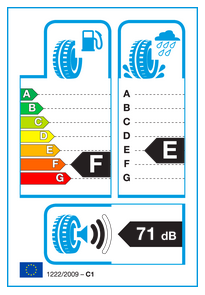
The above was generated (then screenshot) using the genHtmlLabel method of the class
Can now be installed as part of composer. Add it to your composer.json file
with this as a dependency:
"odinshat/tyre-label-generator": "dev-master"
And run:
composer install
Or simply:
git clone https://github.com/OdinsHat/tyre-label-generator.git
There are multiple methods implemented in the class and you can use whichever suits yur needs most.
This method uses a set of identically sized images and overlays them to create the required full label type using inline CSS to ensure they align on top of each other. This isn't the recommended way but is by far the easiest to get going.
E.g.
$label = new TyreLabel('F', 'E', 71, 2);
echo $label->genHtmlLabel();
The outputted HTML would look something like this:
<div style="position:relative">
    <img src="/images/label/bg.png" alt="EU tyre Label" style="position:relative; z-index:0;" />
    <img src="/images/label/fuel_f.png" style="position:absolute;z-index:1" />
    <img src="/images/label/wet_e.png" style="position:absolute;z-index:1" />
    <img src="/images/label/db_71.png" style="position:absolute;z-index:1" />
    <img src="/images/label/sw_2.png" style="position:absolute;z-index:1" />
</div>This will require you to include the provided CSS file tyre-label.css
somewhere in your page or add its styles to your own.
$label = new TyreLabel('F', 'E', 71, 2);
echo $label->genCssLabel();<div class="tyre-label-container">
<img src="/images/label/bg.png" alt="EU Tyre Label" class="tyre-label-base" />
<img src="/images/label/fuel_f.png" class="tyre-label-overlay" />
<img src="/images/label/wet_e.png" class="tyre-label-overlay" />
<img src="/images/label/db_71.png" class="tyre-label-overlay" />
<img src="/images/label/sw_2.png" class="tyre-label-overlay" />
</div>$image = new TyreLabel('F', 'E', 71, 2,280,"images/");
$image = $image->genPngLabel();
header('Content-type: image/png');
imagepng($image);
imagedestroy($image);
die;Couple of basic tests are done using PHPUnit. To run them grab the repo and run phpunit on the tests folder:
git clone git@github.com:OdinsHat/tyre-label-generator.git
cd tyre-label-generator
phpunit tests