
ZeroTrustBounty is a local-first demo stack for submitting, verifying, and paying bug bounty reports backed by TLSNotary proofs.
 The current implementation is built around three active pieces:
tlsn-docker/: a Dockerized TLSNotary notary server and HTTP APIburpsuite-tlsnotary-extension/: a Burp Suite extension that generates TLSNotary proofs from HTTPS trafficbug-bounty-platform/: a Next.js webapp that accepts uploaded TLSNotary presentations, verifies them through the Docker API, supports a gated redaction/reveal workflow, and records dummy payouts
The old Lit-based prototype is no longer part of the active product flow and has been removed from this repo.
The end-to-end flow implemented in this repository is:
- A researcher selects an HTTPS request in Burp Repeater or Proxy.
- The Burp extension sends that request to the local
tlsn-apiservice. tlsn-apitalks to the local notary server, generates proof artifacts, and returns them to the extension.- The extension writes the proof artifacts to disk:
*.presentation.tlsn*.full.presentation.tlsnwhen the request was redacted*.attestation.tlsn*.secrets.tlsn
- The researcher uploads the redacted or full
*.presentation.tlsnfile to the webapp. - The webapp verifies that presentation by calling the same
tlsn-api /verifyendpoint. - If the original proof hides request components, the company reviews the verified TLSNotary response, confirms a bounty amount, and unlocks the reveal step.
- The researcher uploads the matching
*.full.presentation.tlsncompanion proof. - The webapp verifies that the full proof comes from the same notarized TLS session by matching the attestation fingerprint, server name, and session time.
- The company can record a dummy payout directly from the report view or company dashboard.
bug-bounty-platform/Next.js 16 + React 19 + Prisma + SQLite application.burpsuite-tlsnotary-extension/Burp Suite extension built with the Montoya API and Gradle.tlsn-docker/Rust wrapper binaries plus Docker Compose for the notary and HTTP API.tlsn/Vendored TLSNotary workspace and legacy examples. This is useful as reference code, but it is not the runtime integration path used by the webapp or Burp extension.components/Supporting Rust crates used by the vendored TLSNotary workspace.
The live integration path is tlsn-docker/.
It builds one local image that provides four binaries:
tlsn-notary-servertlsn-provetlsn-verifytlsn-api
docker-compose.yml starts:
notaryInternal addressnotary:7047Host port${TLSN_NOTARY_PORT:-7048}apiInternal bind0.0.0.0:8090Host port${TLSN_API_PORT:-8090}
The host intentionally defaults to 8090 instead of 8080.
The Docker wrapper pins the upstream tlsn crate to tag v0.1.0-alpha.14.
The Burp extension no longer uses the old Python bridge. It talks directly to tlsn-api.
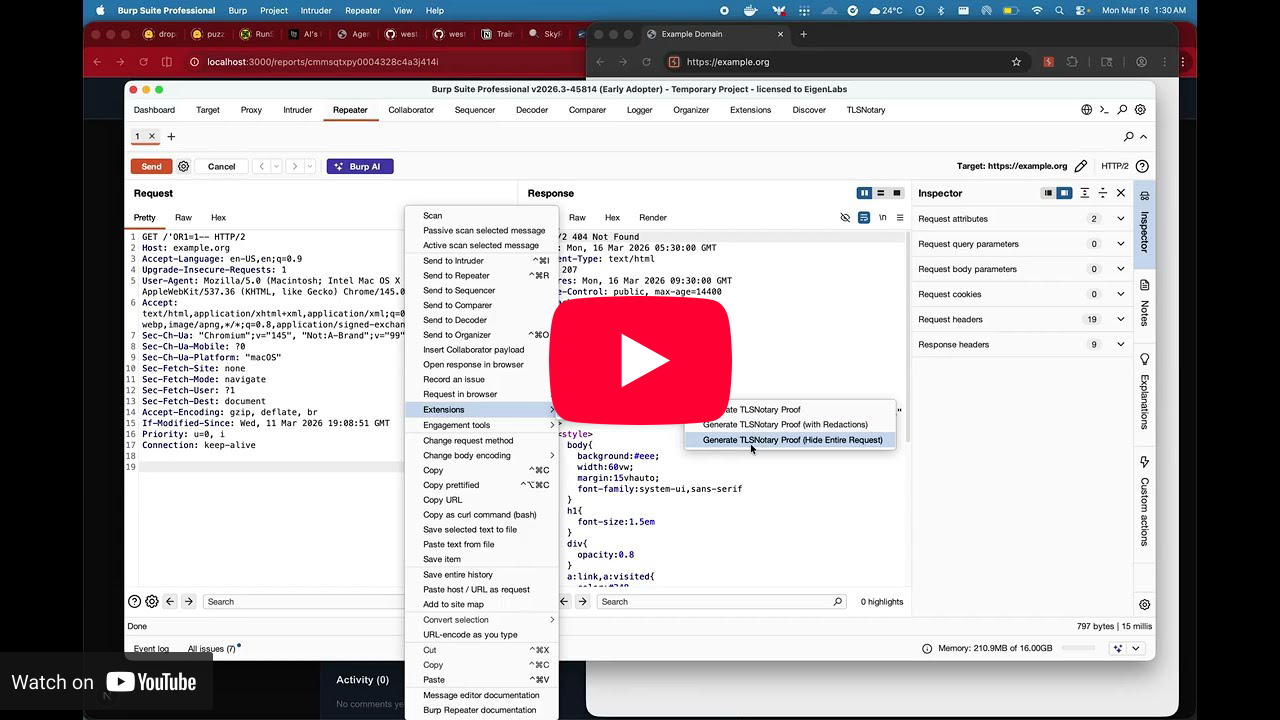
The context menu exposes three generation paths:
Generate TLSNotary ProofGenerate TLSNotary Proof (with Redactions)Generate TLSNotary Proof (Hide Entire Request)
For each request, the extension:
- Rejects plain HTTP traffic. Only HTTPS requests can be proven.
- Sends a JSON payload to
POST /prove. - Receives base64-encoded artifacts from the API.
- Writes them to the configured output directory.
- Shows a success dialog with the saved paths and actions like opening the proof folder.
When the request is partially or fully hidden, the API also returns a companion full presentation from the same notarized session. That file is what the webapp later expects during the reveal step.
The webapp accepts .presentation.tlsn uploads and verifies every uploaded presentation server-side before storing it.
The main routes are:
POST /api/reports/[id]/verify-proofVerifies the initially uploaded presentation throughtlsn-api /verifyPUT /api/reports/[id]/proof-revealVerifies the companion full presentation and matches it to the redacted onePOST /api/reports/[id]/proof-revealCompany-side unlock action that confirms a bounty amount and allows the reporter to reveal the full requestPOST /api/reports/[id]/payRecords a dummy payout
The webapp stores the uploaded proof bytes in SQLite as base64 fields on the Report model together with verified metadata such as:
tlsProofServerNametlsProofTimetlsProofSentDatatlsProofRecvDatatlsProofFingerprinttlsProofRevealStatetlsProofFulltlsProofFullFingerprint
The platform does not trust filenames or pasted request text. The reveal workflow trusts the verified proof metadata itself.
If the initial presentation hides request bytes, the current flow is:
- Researcher uploads the redacted
*.presentation.tlsn. - The webapp verifies it and marks the report as
awaiting_company_confirmation. - The company reviews the verified TLSNotary response and confirms a bounty amount.
- The report moves to
ready_for_reporter_reveal. - The researcher uploads the matching
*.full.presentation.tlsn. - The webapp verifies that:
- the full presentation is valid
- it is not still redacted
- it has the same attestation fingerprint as the redacted proof
- it has the same verified server name
- it has the same verified session time
- The report moves to
revealed.
This is an intentional proof-to-proof match. The platform no longer tries to compare pasted plaintext request bodies byte-for-byte.
Every company report row now exposes a payout button, and the report detail page exposes the same action.
The payout route:
- uses the report bounty amount if one is already set
- otherwise falls back to a dummy default payout of
$500 - decrements the company
availableFunds - creates or updates a
Paymentrow withstatus = "paid" - increments the program
totalPaid - increments researcher reputation by
floor(amount / 100)
All seeded companies start with $100,000 in dummy funds.
You need the following installed locally:
- Docker Desktop or another Docker runtime
- Node.js and npm
- JDK 17+
- Gradle, or a Gradle wrapper if you add one later
- Burp Suite Community or Professional if you want to use the extension
From the repo root:
cd tlsn-docker
docker compose build
docker compose up -d notary api
curl -sS http://127.0.0.1:8090/health
Expected behavior:
- the notary listens on host port
7048 - the API listens on host port
8090 /healthreturns{"status":"ok",...}
If you need different host ports:
TLSN_NOTARY_PORT=7050 TLSN_API_PORT=8091 docker compose up -d notary apiIf you do that, point both the Burp extension and the webapp at the new API URL.
cd bug-bounty-platform
npm install
npm run db:setup
npm run dev
Important behavior built into the scripts:
npm run devrunsprisma generateandprisma migrate deploybefore Next startsnpm run startdoes the same- the default SQLite database is
bug-bounty-platform/dev.db - if
DATABASE_URLis not set, the app falls back to that local file automatically
Open the app at the port Next assigns locally.
cd burpsuite-tlsnotary-extension
./scripts/build_extension.sh
This produces:
burpsuite-tlsnotary-extension/tlsnotary-burp-extension.jar
Load that JAR into Burp:
- Go to
Extensions - Click
Add - Choose type
Java - Select
tlsnotary-burp-extension.jar
In the TLSNotary Burp tab, set:
API URLUsuallyhttp://127.0.0.1:8090Proof Output DirectoryDefaults to~/tlsnotary-proofsTimeoutDefault120secondsHide request by defaultOptional convenience default
Leave Use custom notary / CA overrides disabled for the normal Docker setup. Those overrides are resolved from inside the API container, not from your Burp host.
npm run db:setup seeds the application with demo users and programs.
All seeded users use password password123.
Researchers:
alice@researcher.combob@hacker.iocarol@security.dev
Companies:
security@acmecorp.combugs@techgiant.iosecurity@cryptovault.fi
Seed details:
- every seeded company gets
$100,000inavailableFunds - the default fallback payout amount is
$500 - seed data also creates demo programs and reports
The Docker API and Burp extension produce modern binary TLSNotary artifacts, not the old JSON proof format from the vendored legacy examples.
*.presentation.tlsnThe verifier-facing proof presentation*.full.presentation.tlsnOptional companion proof used when the initial presentation hid request bytes*.attestation.tlsnNotary attestation bytes*.secrets.tlsnProver-side secrets used to derive presentations
Artifact stems are derived from the verified server name with non-alphanumeric characters replaced by _.
Examples:
example_com.presentation.tlsnexample_com.full.presentation.tlsnwww_google_com.attestation.tlsn
tlsn-docker/artifacts/Artifacts persisted by the Docker API whenpersist: true~/tlsnotary-proofsDefault Burp output directory on macOS/Linux- SQLite database fields in
bug-bounty-platform/dev.dbThe webapp stores uploaded presentation bytes as base64 after verification
- Start the Docker services.
- Load the Burp extension.
- Send an HTTPS request to Repeater.
- Right-click and choose one of the TLSNotary proof actions.
- Wait for proof generation to finish.
- Open the saved proof folder from the success dialog if needed.
- Upload the
*.presentation.tlsnfile to a report in the webapp.
What the webapp does next:
- verifies the presentation through
tlsn-api /verify - stores the proof and verified metadata on the report
- renders the verified request and response
- marks hidden-request proofs as needing company confirmation before reveal
Flow B: Hidden request / gated reveal
Use this flow when the researcher wants to prove the response without fully disclosing the request up front.
- In Burp, generate a proof with redactions or hide the full request.
- Burp saves both:
host.presentation.tlsnhost.full.presentation.tlsn
- Upload
host.presentation.tlsnto the report first. - The company reviews the verified response data and sets a bounty amount.
- After that unlock step, the reporter uploads
host.full.presentation.tlsn. - The webapp verifies that both presentations come from the same notarized session.
The company is expected to confirm the issue using the verified TLSNotary response before the full request is revealed.
Any company-owned report can be paid from:
- the company dashboard report table
- the individual report detail page
When the button is clicked, the app records a paid Payment row and updates the balances in SQLite immediately. There is no external payment processor.
tlsn-api exposes three main endpoints.
Returns a simple health payload showing the API status and configured notary address.
Request:
{
  "presentation_b64": "<base64 presentation bytes>",
  "file_name": "proof.presentation.tlsn"
}
Response:
statusattestation_fingerprintserver_namesession_timesent_datarecv_datasent_lenrecv_len
The returned transcript text uses X for hidden bytes.
Minimum request:
{
  "target_host": "example.com",
  "target_port": 443,
  "request_b64": "<base64 raw HTTP request>",
  "persist": true
}
Common fields supported by the current code:
target_hosttarget_portrequest_b64persisthide_requesttimeout_secondsoutput_stemmax_sent_datamax_recv_dataredaction_rulesnotary_hostnotary_portca_cert_path
Supported redaction rule types:
HEADERBODYSUBSTRINGFULL_REQUEST
When the request is redacted, the response may include:
full_presentation_file_namefull_presentation_b64persisted_full_presentation_path
The API rejects non-TLS requests with a clear error instead of attempting to prove plain HTTP.
- Next.js 16 App Router
- React 19
- Prisma 7 with the libSQL adapter
- SQLite
- JWT cookie auth
DATABASE_URLOptional. Defaults tofile:<repo>/bug-bounty-platform/dev.dbJWT_SECRETOptional for local dev, but should be set explicitly outside a demo environmentTLSN_API_URLOptional. Defaults tohttp://127.0.0.1:8090
The report page currently supports:
- drag and drop
- file chooser
- paste
for both the initial proof upload and the later companion full-proof upload.
Every .presentation.tlsn accepted by the webapp is verified through the Docker API first.
That includes:
- the initial proof upload
- the later full presentation reveal upload
- any fallback revalidation needed to recover an older missing attestation fingerprint
- API URL:
http://127.0.0.1:8090 - Notary overrides: disabled
- Output directory:
~/tlsnotary-proofs - Timeout:
120s
The extension writes returned artifacts directly to the configured output directory.
When the proof is redacted, it writes both:
- the redacted presentation for immediate sharing
- the full presentation for later reveal
After proof generation, the result dialog keeps the saved file paths visible and includes an action to open the proof folder. That is the most reliable way to move the generated presentation into another app.
The repo still contains tlsn/ and components/ because the Docker wrapper depends on the upstream TLSNotary ecosystem and those sources remain useful for reference and experimentation.
However:
- the production path in this repo is
tlsn-docker/ - the webapp does not call the vendored
tlsn/examplescode - the Burp extension does not use the old Python bridge anymore
- the old Lit encryption prototype has been removed
Check:
tlsn-apiis running- the API is reachable at
http://127.0.0.1:8090 - the uploaded file is a
.presentation.tlsnartifact, not an attestation or secrets file
Check:
- the selected request is HTTPS, not HTTP
- the API URL in Burp points to
8090 - notary overrides are disabled unless you intentionally need them
- the Docker services are up
A hidden proof cannot be revealed
Make sure the reporter uploads the companion *.full.presentation.tlsn file generated from the same TLSNotary session, not a second unrelated presentation.
Run:
cd bug-bounty-platform
npm run db:migrate
In normal local development, npm run dev and npm run start already do this automatically before the app boots.