
Readmade is a drag-and-drop workspace for writing repository documentation. Arrange
ready-made blocks, preview GitHub-faithful Markdown in real time, and export a clean
README.md without hand-writing the syntax. Everything runs in your browser.



Created by Bilal Malik
Follow on Github bilalmlkdev
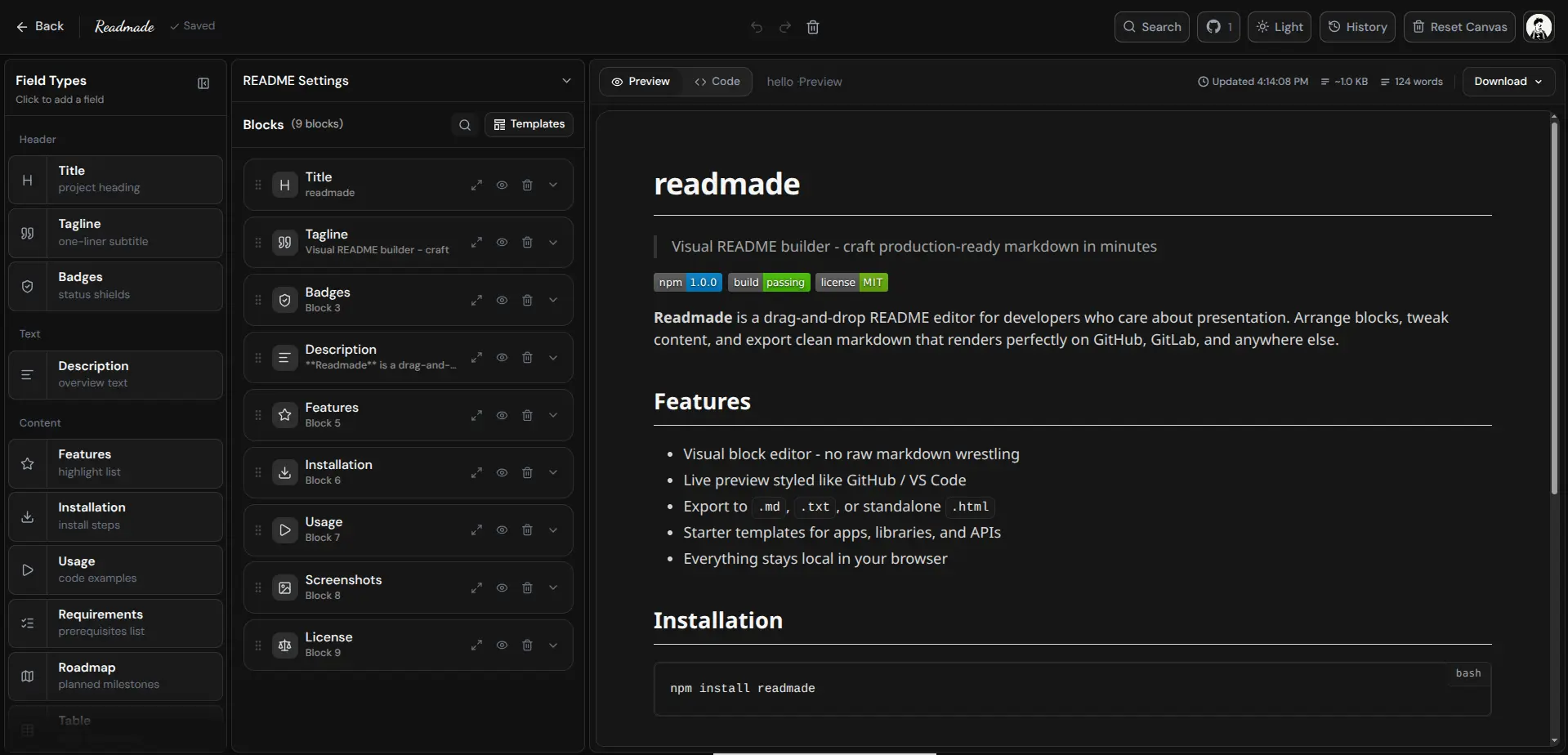
A README is often the first conversation someone has with a project. Blank files are a slow start, and hand-written Markdown goes stale. Readmade gives docs a canvas: pick the sections that matter, fill them in, reorder until the story is clear, then commit plain Markdown that belongs in your repo. No account, no backend, no lock-in. Preview and Code tabs share one source of truth. Export as Markdown, plain text, or standalone HTML with undo, redo, history snapshots, and autosave in the browser.
- Block editor - 18 block types grouped into Header, Text, Content, Media, Docs, and Extras
- Drag and drop - reorder sections with dnd-kit handles
- Live preview - GitHub-like rendering with code highlighting and badge support
- Code tab - inspect the generated Markdown before you export
- Templates - 10 starters for libraries, apps, APIs, CLIs, monorepos, and more
- Search - open the palette from the header and filter blocks by name
- Undo / redo - 50-step stack with typing coalescing
- History - up to 8 autosaved snapshots you can restore
- Export - Markdown (
.md), plain text (.txt), or HTML (.html) - Copy - send Markdown to the clipboard in one click
- Theme - light and dark mode with early paint to avoid flash
- Local storage - workspace lives under the
readmadenamespace inlocalStorage - PWA - installable and usable offline after first load
- Docs - in-app product documentation at
/docs
| Group | Blocks |
|---|---|
| Header | Title, Tagline, Badges |
| Text | Description |
| Content | Features, Installation, Usage, Requirements, Roadmap, Table |
| Media | Screenshots |
| Docs | API Docs, Changelog, FAQ, Credits, Contributing, License |
| Extras | Custom (freeform Markdown) |
Add blocks from the palette, expand a card to edit fields, and drag handles to reorder. Duplicate or delete any block from its card menu.
| Template | Best for |
|---|---|
| Minimal | Small tools with only the essentials |
| Full | Complete README with every major section |
| Library / SDK | npm packages and developer libraries |
| Application | Desktop, web apps, and services |
| API Documentation | HTTP APIs and endpoint references |
| Open Source | Community projects with contributing guides |
| React Component | UI component libraries |
| CLI Tool | Command-line utilities |
| Monorepo | Multi-package repositories |
| Blank | Empty canvas |
Templates only set the initial blocks. Everything stays editable after you load one.
- Open
/app(or start from a landing template). - Pick a template or start blank.
- Fill title, badges, description, and the sections your readers need.
- Reorder with drag and drop until the story is clear.
- Check Preview, then Code, for the exact export.
- Copy Markdown or download
README.mdand commit it.
| Action | What it does |
|---|---|
| Preview | Renders the same Markdown you export |
| Code | Shows generated Markdown with highlighting |
| Copy | Copies Markdown to the clipboard |
| Download | Saves .md, .txt, or .html |
| Stats | Word count and file size |
The download filename follows the Title block name. Screenshots stay as HTTPS image URLs; images are never uploaded.
On Mac the modifier is Cmd; on Windows and Linux it is Ctrl.
| Shortcut | Action |
|---|---|
Ctrl/Cmd + S |
Download the README |
Ctrl/Cmd + Shift + P |
Open the block palette |
Ctrl/Cmd + Shift + R |
Reset the document (confirm required) |
Ctrl/Cmd + Shift + C |
Copy Markdown |
Ctrl/Cmd + Z |
Undo |
Ctrl/Cmd + Y or Ctrl/Cmd + Shift + Z |
Redo |
Esc |
Close palette, dialogs, and drawers |
Ctrl/Cmd + K |
Docs search (on /docs) |
Modifier shortcuts still work while focus is in an input so you can save or copy without leaving the field.
Requires a current Node.js LTS release and npm.
git clone https://github.com/bilalmlkdev/readmade.git
cd readmade
npm install
npm run dev| Script | Purpose |
|---|---|
npm run dev |
Start the dev server |
npm run build |
Production build to dist/ |
npm run preview |
Serve the production build |
npm run lint |
Run ESLint |
Client-only single-page app. React renders the workspace, Zustand holds blocks, and Markdown is derived from blocks on every change. Preview and export share that string, so what you see is what you commit.
| Layer | Choice |
|---|---|
| Build | Vite |
| UI | React 19 |
| Routing | React Router |
| State | Zustand |
| Styling | Tailwind CSS 4 |
| Markdown | marked + DOMPurify |
| Drag and drop | dnd-kit |
| Icons | lucide-react, react-icons |
| Animation | motion |
| Path | Role |
|---|---|
src/components |
App shell, editor, blocks, preview, landing, dialogs |
src/data |
Templates, palette lists |
src/docs |
In-app documentation route |
src/hooks |
Shortcuts, autosave, focus trap, dismiss |
src/lib |
Pure helpers: markdown, theme, export, blocks |
src/store |
Workspace state and browser persistence |
| Path | Page |
|---|---|
/ |
Landing page |
/app |
Editor workspace |
/docs |
Documentation |
* |
Not found |
Code style: keep each source file under 180 lines and split large components. Put pure logic in .js modules, not inside .jsx components. Keep only short hint comments. Use simple hyphens (-) instead of em dashes. Match existing light and dark styles when touching UI.
Readmade is local-first. Your document never leaves the browser unless you export it yourself. There is no sign-up; workspace identity is display-only.
| Key | Purpose |
|---|---|
readmade:blocks |
Current document blocks |
readmade:history |
Up to 8 autosaved snapshots |
readmade:theme |
Light or dark preference |
readmade:paletteMinimized |
Palette UI state |
readmade_browser_id |
Anonymous local workspace id |
readmade_user_name |
Display name for the workspace |
Nothing under this namespace is sent to a server. Clear site data, reset the document, or log out to remove local state. Exported Markdown is yours to commit anywhere.
Issues and pull requests are welcome. Open an issue for a substantial change, or send a focused PR with a clear description and a passing build:
npm run lint
npm run build
Also see CONTRIBUTING.md, CODE_OF_CONDUCT.md, SECURITY.md, and CHANGELOG.md. In-app docs at /docs cover blocks, templates, editor behavior, shortcuts, architecture, storage, security, and license.
Readmade is open source under the MIT License.
MIT License

Copyright (c) 2026 Bilal Malik

Permission is hereby granted, free of charge, to any person obtaining a copy
of this software and associated documentation files (the "Software"), to deal
in the Software without restriction, including without limitation the rights
to use, copy, modify, merge, publish, distribute, sublicense, and/or sell
copies of the Software, and to permit persons to whom the Software is
furnished to do so, subject to the following conditions:

The above copyright notice and this permission notice shall be included in all
copies or substantial portions of the Software.

THE SOFTWARE IS PROVIDED "AS IS", WITHOUT WARRANTY OF ANY KIND, EXPRESS OR
IMPLIED, INCLUDING BUT NOT LIMITED TO THE WARRANTIES OF MERCHANTABILITY,
FITNESS FOR A PARTICULAR PURPOSE AND NONINFRINGEMENT. IN NO EVENT SHALL THE
AUTHORS OR COPYRIGHT HOLDERS BE LIABLE FOR ANY CLAIM, DAMAGES OR OTHER
LIABILITY, WHETHER IN AN ACTION OF CONTRACT, TORT OR OTHERWISE, ARISING FROM,
OUT OF OR IN CONNECTION WITH THE SOFTWARE OR THE USE OR OTHER DEALINGS IN THE
SOFTWARE.