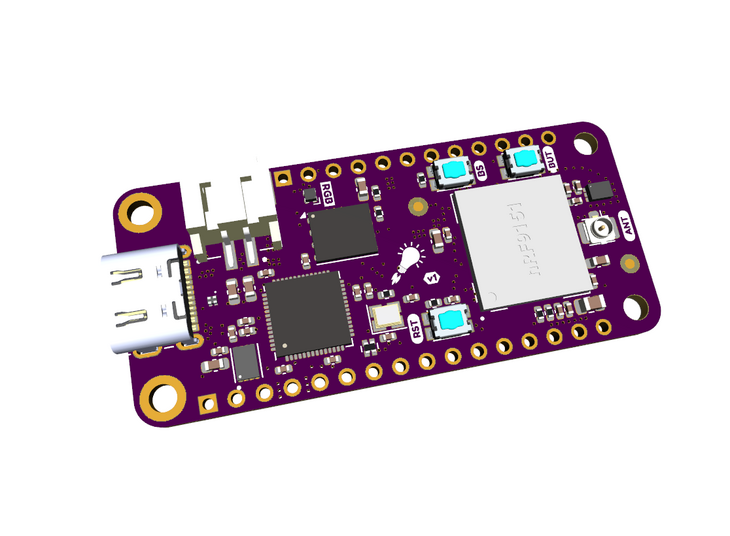
- This guide covers the complete steps required to go from a new nRF9151 Feather board to a working GEO-NB NTN (Non-Terrestrial Network) environment over the Skylo-Viasat-Inmarsat network using VS Code and the CircuitDojo ncs-serial-modem application.
- The below was carried out on an Ubuntu 24.04 system so caveat emptor if you are running on Windows or macOS system
- Massive kudos to jaredwolff for designing, developing and supporting what is a perfect, small-form factor, nRF5191-based module for product prototyping
- nRF9151 Feather board (A1A silicon)
- NTN-enabled SIM (I use Monogoto but there are alternate NTN-enabled SIMs from other MVNOs)
- Wideband antenna supporting GNSS L1 plus NTN L/S-band (and any requisite LTE TN bands if required) - see next section
- Rust toolchain installed (
rustup) - VS Code with nRF Connect extension installed
- probe-rs v0.31.0 or later installed (
cargo install probe-rs-tools)
- The nRF9151 Feather combines the GNSS and LTE/NTN antenna feeds so selection of a suitable wideband antenna that covers the required bands is required. This invariably needs to include the GNSS L-band, the NTN L and/or S-bands plus any required terrestrial LTE bands
- This selection is arguably the most critical elememt in your system : the 23dBm transmit power from the NB-IoT UE can severely challenge the link budget for a reliable GEO-NB NTN attach given a range of factors including whether the LoS (line-of-sight) to the GEO spacecraft is obscured, the latitude of the UE (and hence the look angle to the GEO spacecraft) and also whether the UE is expected to close the link whilst in motion or not
- Assuming you are using a Skylo-supported SIM, you will need an antenna that supports the L-band (Global) aka n255 so:
- DL: 1525–1559 MHz
- UL: 1626.5–1660.5 MHz
- ...and/or S-band (Europe) aka n256 so:
- DL: 2170–2200 MHz
- UL: 1980–2010 MHz
- GPS L1 sits at 1575.42 MHz so close to n255 however an antenna that covers 1559–1610 MHz would bring in the other GNSS constellations i.e. GLONASS, Beidou and Galilleo as well. However this assumes Nordic will add support for these GNSS constellations in future versions of the nRF5191 firmware and hardware
- [TODO]
- Beyond antenna selection, there are a host of design and operating considerations specific to your use-case such as optimising for battery life, NTN-TN integration, TCP vs UDP vs NIDD, etc. An excellent and highly-recommended paper on these and other relevant topics has been authored by Kyocera AVX on optimizing IoT devices for GEO NB-NTN hybrid connectivity
- Install nRF Connect for Desktop
- Open Toolchain Manager
- Install NCS v3.2.4 toolchain and SDK
- Toolchain installs to:
/<path_to>/ncs/toolchains/<hash> - SDK installs to:
/<path_to>/ncs/v3.2.4
cd /<path_to>/GitHub
cargo install --git https://github.com/circuitdojo/modem_updater.gitDownload mfw_nrf9151-ntn_1.0.0-1.alpha.zip from Nordic's website under nRF9151 SiP NTN firmware.
Note: Run
verifyonly after a successfulprogram— not before. Runningverifyagainst a different firmware variant than what is currently flashed will return a NACK error.
updater program /<path_to>/Downloads/mfw_nrf9151-ntn_1.0.0-1.alpha.zip
updater verify /<path_to>/Downloads/mfw_nrf9151-ntn_1.0.0-1.alpha.zippip3 install --user -U west
cd /<path_to>/ncs
git clone https://github.com/circuitdojo/ncs-serial-modem.git
cd ncs-serial-modem
unset ZEPHYR_BASE
west init -l /<path_to>/ncs/ncs-serial-modem
west updateNote:
unset ZEPHYR_BASEis required if VS Code has set it in the environment, otherwisewest initwill fail with "already initialized" error.
mkdir -p /<path_to>/ncs/ncs-serial-modem/.vscode
cat > /<path_to>/ncs/ncs-serial-modem/.vscode/settings.json << 'EOF'
{
    "nrf-connect.boardRoots": [
        "/<path_to>/ncs/nfed"
    ]
}
EOF
After saving, reload VS Code:
Ctrl+Shift+P→ Developer: Reload Window.
- Select
Open an exisitng applicationin the VSC nRF Connect Welcome panel - Select
/<path_to>/ncs/ncs-serial-modem/appin the folder dialog - In the nRF Connect Applications panel in VSC select
Add build configuration - Set the following:
- Board:
circuitdojo_feather_nrf9151@3/nrf9151/ns - SDK: v3.2.4
- Toolchain: v3.2.4
- Application:
app - Build system: sysbuild
- Board:
- Click Gemerate and Build
probe-rs download --chip nRF9151_xxAA --binary-format hex \
  /<path_to>/ncs/ncs-serial-modem/app/build/merged.hex --allow-erase-all
probe-rs reset --chip nRF9151_xxAA
Note: The
--allow-erase-allflag is required if the core is locked. This is normal after a fresh flash or failed flash attempt.
I tend to switch between
tioand the Serial Terminal tool in thenRF Connect Desktopfor AT comms. If you are usingtioor similar, then you may need to add a local echo to see your typed commands. Ontiothis is with the--local-echoparameter:
tio --local-echo /dev/ttyACM0However the
nRF Connect DesktopSerial Terminal has other nice options such as command history that can be recalled as well as the ability to save command history to a file
AT+CGMR
Expected response:
mfw_nrf9151-ntn_1.0.0-1.alpha
- Important: GNSS must be acquired before switching to NTN system mode. Run this sequence first if you want a live GPS fix rather than manually entering coordinates.
- Note: you'll need an external antenna but that will be required for the NTN modem anyway as per above
AT+CFUN=4
AT%XSYSTEMMODE=0,0,1,0,0
AT+CFUN=31
AT#XGNSS=1,0,0,0
The wait for a fix response can take several minutes on cold start but should eventually return:
#XGNSS: <lat>,<lon>,<alt>,<accuracy>,<speed>,<heading>,"<datetime>"
Note the coordinates, then stop GNSS:
AT#XGNSS=0
- Note: Band n23 = Canada, band n255 = L-band Global, band n256 = S-band Europe (Skylo).
- For best results with a single patch antenna, consider restricting to band n255 only (
AT%XBANDLOCK=2,,"255") given n255 is closest to the L1 and L5 bands used by GNSS - Replace
<lat>,<lon>,<alt>with coordinates from the GNSS fix above, or enter known static coordinates. - Each value must be a separate quoted string.
AT+CFUN=4
AT%XSYSTEMMODE=0,0,0,0,1
AT%XBANDLOCK=2,,"255"
AT%LOCATION=2,"<lat>","<lon>","<alt>",0,0
AT+CEREG=5
AT+CNEC=24
AT+CSCON=3
AT%MDMEV=2
AT+CFUN=1
Expected connection indications:
%MDMEV: SEARCH STATUS 1
+CEREG: 2,"<tac>","<ci>",14
%MDMEV: PRACH CE-LEVEL 0
+CSCON: 1,7,4
%MDMEV: SEARCH STATUS 2
+CEREG: 5,"<tac>","<ci>",14,,,"11100000","00111000"
- The duration for the attach and registration following the
AT+CFUN=1command can be highly variable given the nature of the signalling path from the UE to the RAN via GEO to the (cloud-hosted) EPC/5G Core...and back. - FWIW I have observed typical durations of between 50 and 60 secs for this sequence using monogoto aka Skylo aka Viasat-Inmarsat in Northern Europe via I4F4 (Alphasat)
AT+CESQ
AT%XMONITOR
AT+CESQreturns 6 values — the last two are RSRQ and RSRP. Higher values indicate better signal quality.
AT#XSOCKET=1,2,0
AT#XCONNECT="<your_UDP_server_IP_addr>",<port_num>
AT#XSEND="Hello Feather"
AT#XSOCKET=0
- Expected responses:
#XSOCKET:0,2,17,#XCONNECT:1,#XSEND:13,#XSOCKET:0,"closed" - If you are using Monogoto, you can sign up and use the ubidots service to send UDP test messages although note that the message payload needs to be correctly formatted and converted to hex prior to sending - see Monogoto : Integrate IoT data with Ubidots
AT#XRESET
Note:
AT+CFUN=15does not appear to be supported in the NTN alpha firmware and/or the serial terminal app. UseAT#XRESETinstead.
AT+CFUN=0
AT%XSYSTEMMODE=1,1,0,0,0
AT+CFUN=1
- For some reason
AT+CPIN?returns ERROR — possibly due to lack of correct configuration - As mentiioned
AT+CFUN=15returns ERROR — useAT#XRESETinstead AT#XGPS(referenced in the Monogoto docs for the nRF9151 SMA DK) is not available — useAT#XGNSS(ncs-serial-modem app command) insteadAT%LOCATION=1can be used for automatic modem-requested location updates — the modem sends%LOCATION: <accuracy>[,<time>]notifications whenever a new fix is required for the TA pre-compensation i.e. the modem expects a new GNSS location position to<accuracy>within the next<time>seconds. Note this is not needed if yourvalidity=0i.e. your device is stationary but it is required if the device is mobile (or you are powering the feather down between sessions)
- CircuitDojo nRF9151 Feather
- CircuitDojo ncs-serial-modem
- CircuitDojo modem updater
- Monogoto NTN NRF9151 Guide
- Nordic nRF9151 NTN AT Commands v0.4
- Kyocera AVX Optimizing IoT Devices for GEO NB-NTN Hybrid Connectivity
Issues and pull requests welcome!
Nick Hall
21st March 2026