-Using: Node.js, Mongo Atlas as database, cloudampq (cloud RabbitMQ) as message queueing, mocha.js and chai as testing tools , Postman for http requests and Docker
- A Real time service that receive a post request from a sender to send a notification to different types of providers by using message queuing system.
- Service also provide APIs to access Notifications’ database (MongoDB), database is used for storage not for sending.
- Test cases coverage by using mocha.js and chai
- Application is run on Docker and available on docker hub
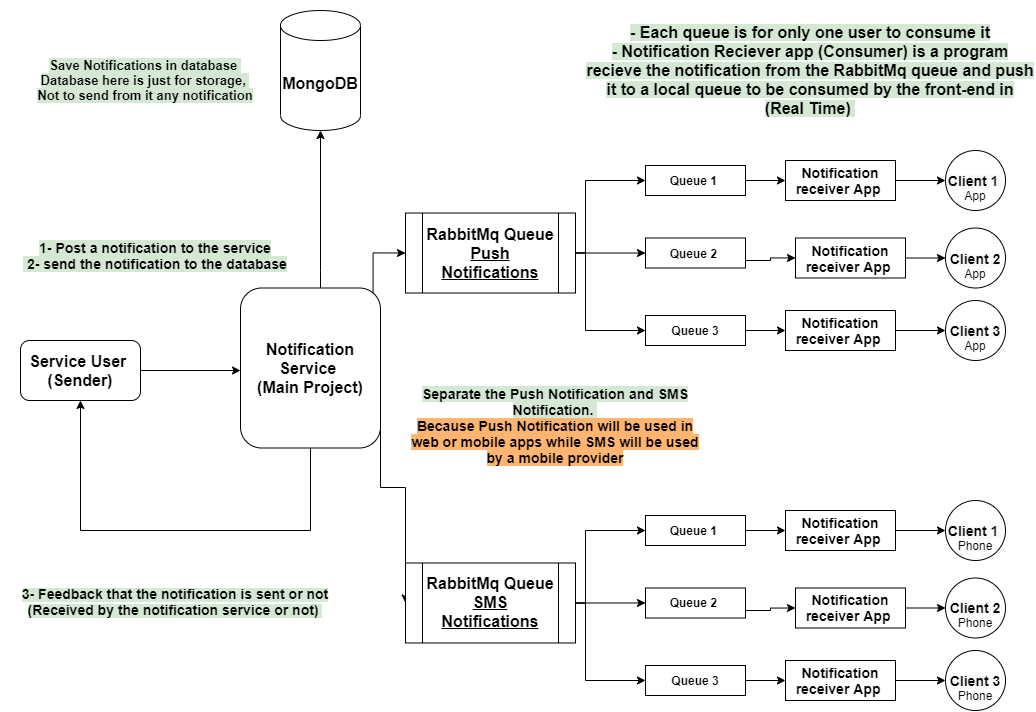
- Main server
- Notification service (our main part)
- MongoDB on Cloud (MongoDB Atlas)
- RabbitMQ ( cloudamqp)
- Simple client side program ( A program which the client runs to get the notification)
-
Main Server / Notification Service Relation :
-
Main server makes a post request with Notification body -Notification service responds by “Notification is sent” and continue the process or responds by the error with out sending the notification -Notification service saves the new notification in the cloud database (Only for recording) -Main Server can read the Notifications records through Notification service’s APIs
-
Notification Service / Cloud queues / Client Relation :
-
There are two separated groups of queues ( Push Notification queues and SMS Notifcation queues ) Why ? To allow front-end layer to consume the notifications from the queue through the “Client-side Progam” to fetch the Notifications in HTML or XML or other options. And also to let a SMS provider to consume the messages by sending it to the clients. Each client has two queue ; a queue for his application and another one for his SMS messages
-
Notification service sends the notification to the right queue of the user/s according to the notification target/s and the provider ( Push Notification or SMS Notification)
-
Client Program contains a function that push the notifications into an local array
-
User can use this array directly to update notification at real-time -Here a question : Why I didn’t use an API to send the messages ? because it will not be a real time notification , every new notification , I need to make a request , may be Main server sends more than one notification between two recursive requests.
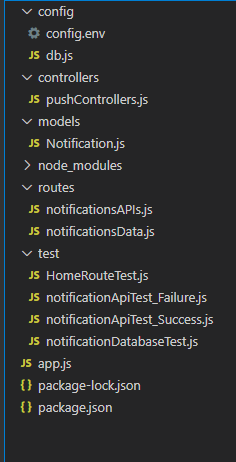
- Config.env : configuration file that contains the configurations of the Mongoose , CloudAmpq
- Database configuration : Separated file contain the configuration of the database and only export connect function to use it in our application
- pushControllers: All the function I needed when writing the Publish Notifications API.
- Notification model: contains the schema of the notification to use it in saving to database and publishing it to the queue.
- Routes : Notification API route and Accessing the database APIs
- test : test scripts to test our code, tests are separated into 4 types and all of them run together at testing stage.
- app.js : contains requiring the files and libraries , database connecting function firing , listening to the port and using the routes to be able accessing it
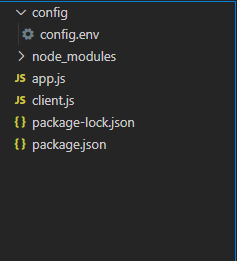
- Config.env : configuration file that contains the configurations of the Mongoose , CloudAmpq
- Client.js : a file containing the code the client needing to receive the notification and exports one function to allow the user receives it
- app.js: user can here use the function with his other pieces of code.
- On the command line: node app
- Using post request by :(/api/pushNotification) to send a notification
- Using get requests to access database:
- 1- /notificationDatabase/readAllNotification/allUsers
- 2- /notificationDatabase/byPhoneNumber/:phoneNumber
- 3- /notificationDatabase/byLanguage/:language
- 4- /notificationDatabase/byProvider/:provider
- 5- /notificationDatabase/notificationContains/:notification
- API’s will be discussed in the next chapter.
- npm run test ( using mocha.js in package.json as test runner)
- Make a post request to send a notification with prober request body
- /api/pushNotification Method : POST Required body : {
- message : required
- provider : required , enum of ["Push Notification", "SMS Notification"] Push is the default
- target (The phonenumber/s that you want to send the Notification) : at least one
- isRead : not required (for future improvments for the service)
- language : enum of [En , Ar ,Fr] not required : En is the default
-
1- if notification is successfuly sent : it will return Msg is successfuly statusCode :( 200)
-
Errors :
- No targets : "No targets are Supported " statusCode :(400 Bad request)
- No message supported in the Notification : "No message is Supported" (400 Bad request)
- Other provider : "Notification is not a provided Notification type" statusCode : (400 Bad request)
-
2- Returns all the notifications in the database Method : GET
- /notificationDatabase/readAllNotification/allUsers 3- Returns all the notifications sent to a phonenumber Method : GET
- /notificationDatabase/byPhoneNumber/:phoneNumber 4- returns all the notifications by a certain language Method : GET
- /notificationDatabase/byLanguage/:language 5- returns all the notifications by a certain provider Method : GET
- /notificationDatabase/byProvider/:provider 6- returns all the notifications that contains a certain string ( example : (essa)------> returns notifications contain : ( message )) Method : GET
- /notificationDatabase/notificationContains/:notification
- The server doesn't need to modify or delete a Notification from the database.
- Why?
- Database here is only a recording storage, Server will need only to create or read the database. Creation is only needed when sending a Notification (Push Notification Routes). So here, we make APIs for only reading from the database
- Home routes test :
- GET request to main route “/”
- Wrong GET request to non-supported path
- Notification API (Request Success):
- 1- All the notification body is provided (one target)
- 2- All the notification body is provided (many targets)
- 3- Default values is not provided
- 4- Default values is not provided (many targets)
- Notification API (Request failure):
- 1- Message is not provided
- 2- Message is not provided (many targets)
- 3- No targets in the notification body
- 4- Unknown provider is provided 5- No notification is supported in the post request
- Database APIs:
- 1- Getting all the users
- 2- Getting Notifications with specific language
- 3- Getting Notifications with specific phone number
- 4- Getting Notifications with specific provider
- 5- Getting Notifications containing specific string