


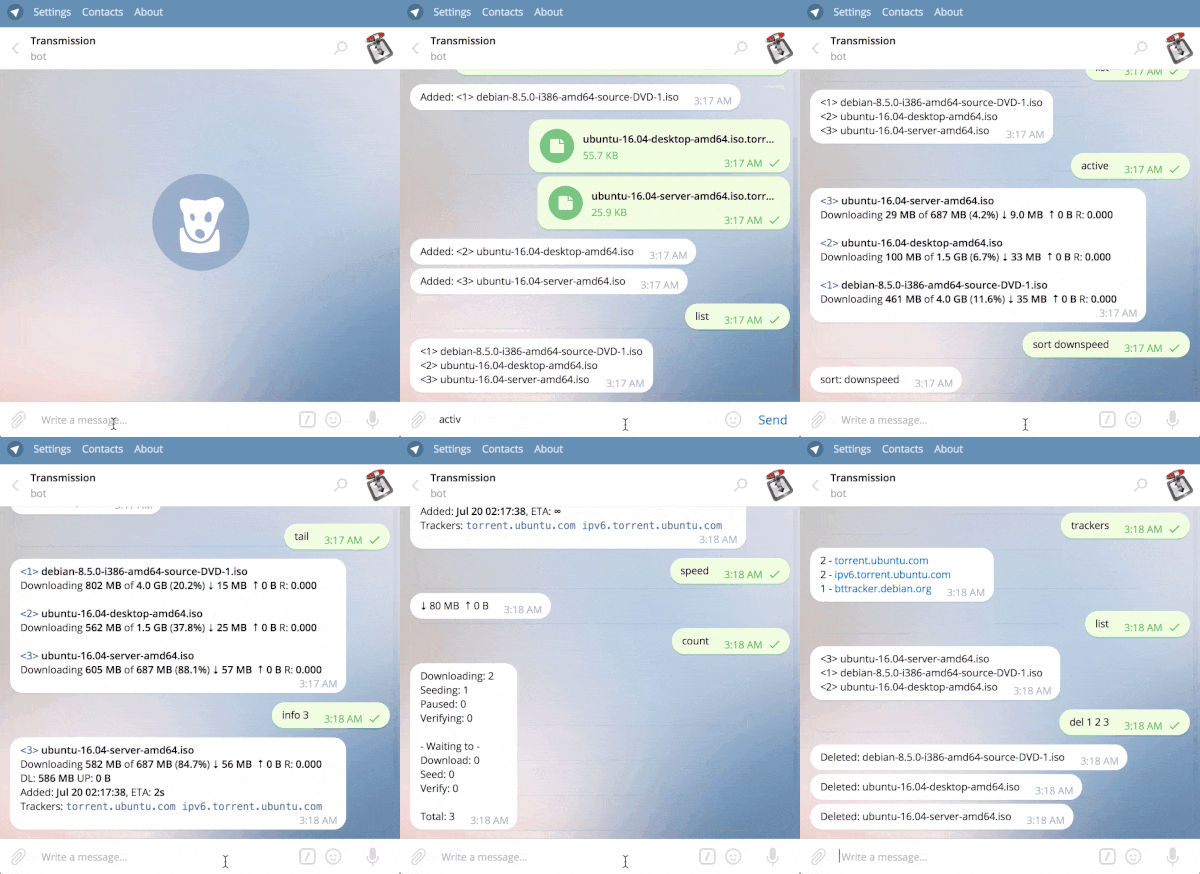

- ⚡ Modern Telegram Bot Engine: Built with
github.com/go-telegram/botwith native graceful shutdown, context propagation, and structuredlog/sloglogging. - 🎛 Interactive Inline Buttons: Pause, resume, and delete torrents from
/info; destructive inline deletion requires an explicit confirmation. - 📊 Visual Progress Bars: Clean Unicode progress bars (
[█████░░░░░] 50.0%) on/head,/tail,/active,/paused,/checking, and/info. - 🔔 Operational Alerts: Receive completion notifications plus one-shot Transmission outage and recovery alerts through the default RPC watcher. Optional logfile monitoring follows file rotation and falls back to RPC polling if startup fails.
- 🐢 Turtle Mode & Utilities: Instant speed toggling (
/turtle), free disk space checker (/free), and manual tracker re-announcing (/reannounce). - 🔒 Flexible Authorization: Restrict access with a repeatable
-masterlist supporting Telegram usernames and stable numeric user IDs. - 👥 Group Chat Ready: Clean handling of group mentions (e.g.
/list@BotName). - 📱 Telegram Menu Auto-Registration: Automatically configures the Telegram command suggestion menu on startup.
Download an archive for Linux, macOS, Windows, or FreeBSD from the Releases page. Each release includes SHA-256 checksums.
Go 1.21 is the tested minimum; using a current supported Go release is recommended.
go install github.com/pyed/transmission-telegram/cmd/bot@latesttransmission-telegram is configured via command-line flags or environment variables:
| Flag | Environment Variable | Description |
|---|---|---|
-token |
TT_BOT_TOKEN (TT_BOTT legacy) |
Telegram bot token (required) |
-master |
— | Authorized Telegram username or numeric user ID (required, repeatable) |
-url |
TR_URL |
Transmission RPC URL (default: http://localhost:9091/transmission/rpc) |
-username |
TR_AUTH (user:password) |
Transmission RPC username |
-password |
TR_AUTH (user:password) |
Transmission RPC password |
-logfile |
— | Send bot logs to a file (default: stdout) |
-transmission-logfile |
— | Read completion events from a local Transmission log (optional; defaults to RPC polling) |
-no-live |
— | Disable real-time editing and live update loops |
Explicit flags override the corresponding environment defaults. Prefer numeric Telegram user IDs for -master; unlike usernames, they cannot be renamed or reassigned.
The RPC watcher reports an outage after three consecutive failed polls, avoiding alerts for brief connection interruptions. It sends only one warning per outage and one recovery message after the next successful poll.
Load TT_BOT_TOKEN and, when needed, TR_AUTH from a protected environment file, service manager, or secret store before starting the bot. Avoid passing tokens and passwords as command-line flags on shared systems because process arguments and shell history may expose them.
transmission-telegram \
  -master="123456789" \
-url="http://localhost:9091/transmission/rpc"| Command | Aliases | Description |
|---|---|---|
/list [query] |
/li, /ls |
List all torrents (or filter by tracker query) |
/head [n] |
/he |
Show the first n torrents with live speed updates (default: 5) |
/tail [n] |
/ta |
Show the last n torrents with live speed updates (default: 5) |
/active |
/ac |
List torrents actively uploading or downloading |
/downs |
/dg |
List torrents currently downloading |
/seeding |
/sd |
List torrents currently seeding |
/paused |
/pa |
List paused torrents |
/checking |
/ch |
List torrents verifying checksums |
/errors |
/er |
List torrents with errors |
/latest [n] |
/la |
List newest added torrents |
/search <query> |
/se |
Search torrents by name |
/info <id...> |
/in |
Show details, progress bar, and interactive control buttons |
/add <url/magnet> |
/ad |
Add torrent by URL or magnet. Sending a .torrent file directly in chat also adds it |
/stop <id...|all> |
/sp |
Stop specific torrents or all |
/start <id...|all> |
/st |
Start specific torrents or all |
/check <id...|all> |
/ck |
Verify specific torrents or all |
/del <id...> |
/rm |
Remove torrent from Transmission |
/deldata <id...> |
— | Remove torrent and delete local files from disk |
/turtle [on|off] |
/alt, /tu |
Toggle or set alternative speed limits ("Turtle Mode") |
/free [path] |
/space, /disk |
Show free and total disk space on the download drive |
/reannounce <id...|all> |
/ra |
Force tracker re-announce |
/speed |
/ss |
Display current download and upload speeds |
/stats |
/sa |
Show Transmission session and cumulative statistics |
/downlimit <KB/s> |
/dl |
Set global download speed limit |
/uplimit <KB/s> |
/ul |
Set global upload speed limit |
/downloaddir <path> |
/dd |
Set default download directory |
/sort <method> |
/so |
Sort torrent listings (id, name, age, size, progress, downspeed, upspeed, download, upload, ratio; prefix with rev for reverse) |
/trackers |
/tr |
List trackers and torrent counts |
/count |
/co |
Show torrent counts grouped by status |
/help |
— | Display command help |
/version |
/ver |
Display Transmission daemon and bot version |
docker run -d --name transmission-telegram \
  --restart unless-stopped \
  --add-host=host.docker.internal:host-gateway \
  -e TT_BOT_TOKEN="<YOUR_BOT_TOKEN>" \
  -e TR_URL="http://host.docker.internal:9091/transmission/rpc" \
  -e TR_AUTH="<username>:<password>" \
  pyed/transmission-telegram:latest \
  -master="<YOUR_NUMERIC_TELEGRAM_ID>"
The example connects to Transmission on the Docker host. When both applications run in Compose, use the Transmission service name instead.
Create a local .env file (never commit it):
TT_BOT_TOKEN=123456789:replace-with-your-token
TELEGRAM_MASTER_ID=123456789
TRANSMISSION_PASSWORD=replace-with-a-strong-password
Then use:
services:
  transmission:
    image: lscr.io/linuxserver/transmission:latest
    container_name: transmission
    environment:
      PUID: 1000
      PGID: 1000
      TZ: Etc/UTC
      USER: transmission
      PASS: ${TRANSMISSION_PASSWORD}
    volumes:
      - /path/to/config:/config
      - /path/to/downloads:/downloads
    ports:
      - "9091:9091"
      - "51413:51413"
      - "51413:51413/udp"
    restart: unless-stopped

  telegram-bot:
    image: pyed/transmission-telegram:latest
    container_name: transmission-telegram
    depends_on:
      - transmission
    restart: unless-stopped
    environment:
      TT_BOT_TOKEN: ${TT_BOT_TOKEN}
      TR_URL: http://transmission:9091/transmission/rpc
      TR_AUTH: transmission:${TRANSMISSION_PASSWORD}
command: ["-master=${TELEGRAM_MASTER_ID}"]- Treat the Telegram bot token and Transmission credentials as secrets. Keep them in protected environment or secret-management facilities and never commit
.envfiles. - Prefer a numeric Telegram user ID in
-master, especially for bots that can delete torrent data. - Keep Transmission RPC on a trusted network or behind appropriate access controls; do not expose an unauthenticated endpoint to the public internet.
- Inline delete buttons expire if torrent identity changes and require confirmation. The explicit
/deldatacommand still deletes local data immediately, so use it carefully.
Please report vulnerabilities according to SECURITY.md, not in a public issue.
See CONTRIBUTING.md for the local verification commands and contribution workflow.
Licensed under the Apache License 2.0.