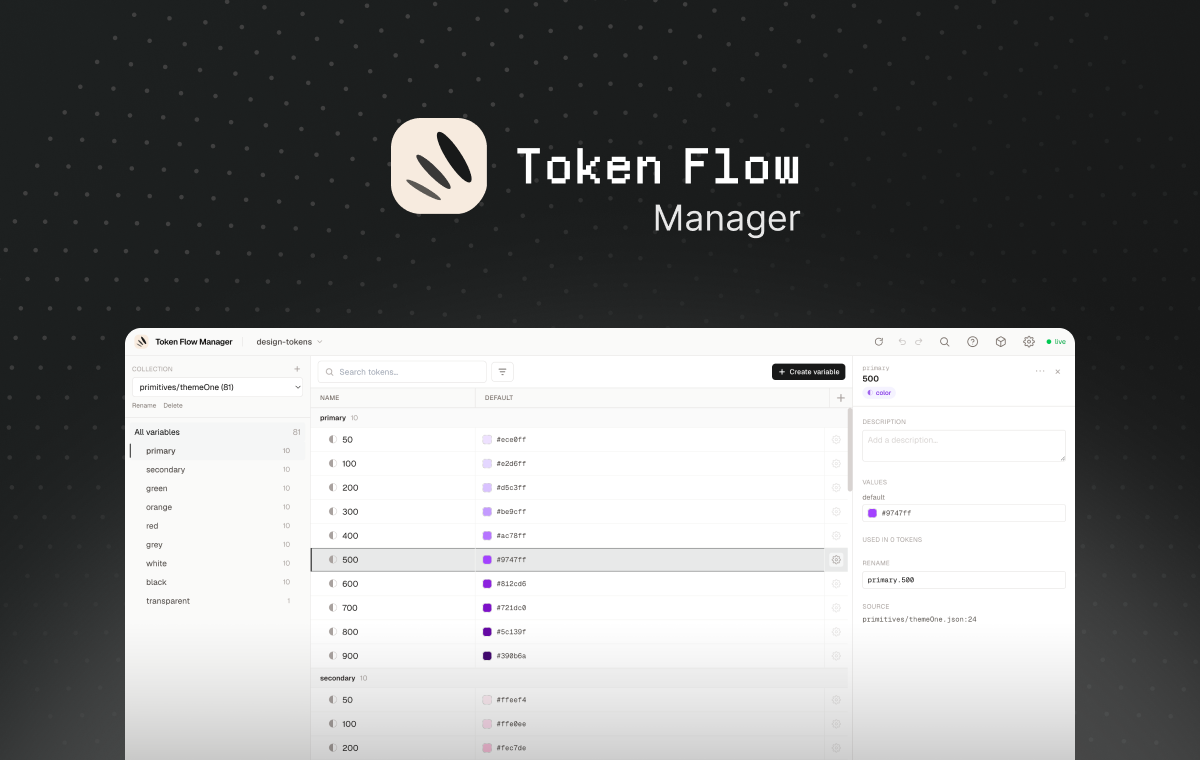
Local Design Tokens manager, visualize, edit and govern your DTCG 2025.10 token files from a Variables-style dashboard, without leaving your project.
It starts a local Node server (bound to 127.0.0.1), parses every *.tokens.json,
resolves aliases across collections and modes, and opens a dashboard. It never
commits, it edits the source JSON in place, atomically, preserving key order and
formatting. Run it with no path and a welcome screen lets you open a recent
project or browse for one.
| Best for | Friction | |
|---|---|---|
| A. CLI package (npm / repo) | developers & designers | none — runs in your browser, no Gatekeeper |
Runs the dashboard in your default browser. Requires Node ≥ 20. No macOS Gatekeeper
issues (it's not a downloaded .app).
# From npm (once published):
npx token-flow-manager             # welcome screen → pick a project
npx token-flow-manager ./design    # open a project directly
npm i -g token-flow-manager        # …or install globally, then run `tokenflow`

# From this repo (no npm publish needed):
#   download the token-flow-manager-<version>.tgz from GitHub Releases, then:
npm i -g ./token-flow-manager-0.1.0.tgz && tokenflow
#   …or clone + build (see Development below) and run:
node packages/cli/dist/cli.js- Welcome screen : recent projects (removable with ×) + a native OS folder picker ("Browse your computer…") with a paste-a-path fallback; open a project from the UI, no path on the command line.
- Project switcher : the header shows the open project's name with a chevron; the dropdown switches to a recent project in place or returns to the welcome screen.
- Variables table : mode columns (light/dark/brand…), alias chips, inline editing, resizable columns.
- Sidebar group tree : Finder-style drag-and-drop: drop a group onto another to nest it, or between two groups to reorder; multi-select with ⌘/Ctrl-click and Shift-click to move several at once.
- Copy / Cut / Paste variables (⌘C / ⌘X / ⌘V) : cut hides the rows immediately and moves them on paste; copy duplicates.
- Search (⌘S) + filters (aliases, deprecated, orphans, errors) and a command palette.
- Undo / redo (⌘Z / ⌘⇧Z), byte-exact and server-side.
- Diagnostics with one-click quick-fixes; Inspector with alias chains and incoming references.
- Keyboard shortcuts help (⌘/ or ?) and the app version in the footer.
| Package | Role |
|---|---|
@tokenflow/shared |
Zod schemas + types: DTCG nodes, internal model, diagnostics, config, API payloads. |
@tokenflow/core |
Engine: DTCG parser (source positions), alias resolver (cycles, broken refs, cross-collection ordering, multi-mode), value validator, format-preserving document mutation. |
@tokenflow/server |
Fastify REST + WebSocket, Session (runtime project switching + folder browser + recents), ProjectManager (load/resolve/mutate), chokidar watcher, atomic writes with rotating backups. |
token-flow-manager |
npx entry point (commander): default serve, validate, init. Self-contained bundle — inlines the workspace packages and embeds the built dashboard. |
@tokenflow/web |
Angular 21 dashboard: welcome screen, shell, sidebar, variables table, inspector, realtime. |
Continuing development? Read HANDOFF.md first — status, architecture map, conventions/gotchas, and the prioritized next tasks. The distribution & onboarding plan lives in plan.md §10.
pnpm install
pnpm -r --filter "./packages/*" test      # run unit + integration tests
pnpm -r --filter "./packages/*" typecheck # strict TS across the board
Build in dependency order — the CLI build embeds the freshly-built dashboard, so
@tokenflow/web must be built before token-flow-manager:
pnpm --filter @tokenflow/shared build
pnpm --filter @tokenflow/server build
pnpm --filter @tokenflow/web build
pnpm --filter token-flow-manager build    # bundles the CLI + embeds the SPA into dist/web
Run against a demo project, or with no path for the welcome screen:
node packages/cli/dist/cli.js ./examples/basic   # open a project
node packages/cli/dist/cli.js # welcome screentoken-flow-manager [path] # start server + dashboard (welcome screen if no path)
token-flow-manager validate # headless parse + resolve, exit 1 on errors (CI-friendly)
token-flow-manager init # scaffold a tokenflow.config.jsonThe CLI is published as a self-contained package (workspace code inlined, dashboard
embedded, third-party deps declared in dependencies). To verify the exact artifact a
user would get, pack it and install it into a clean directory:
# 1. Build everything in order (see above)
pnpm --filter @tokenflow/shared build && \
pnpm --filter @tokenflow/server build && \
pnpm --filter @tokenflow/web build && \
pnpm --filter token-flow-manager build

# 2. Create the publishable tarball
cd packages/cli
npm pack --dry-run     # inspect: must include dist/cli.js + dist/web/* (the SPA)
npm pack               # → token-flow-manager-0.1.0.tgz

# 3. Install it in a throwaway dir (resolves deps from the npm registry, like a user)
mkdir /tmp/tfm-test && cd /tmp/tfm-test && npm init -y
npm i /path/to/packages/cli/token-flow-manager-0.1.0.tgz

# 4. Run it from the clean install
npx token-flow-manager            # welcome screen
npx token-flow-manager ./somedir  # open a project
If step 4 starts the server and serves the dashboard with no ERR_MODULE_NOT_FOUND,
the package is publish-ready. (Then a real user does npm i -g token-flow-manager once
it is published, and runs tokenflow.)
Bumping the version: keep
packages/cli/package.jsonandpackages/web/src/app/core/version.ts(APP_VERSION, shown in the footer) in sync, add a CHANGELOG entry — see plan.md §10.1.