


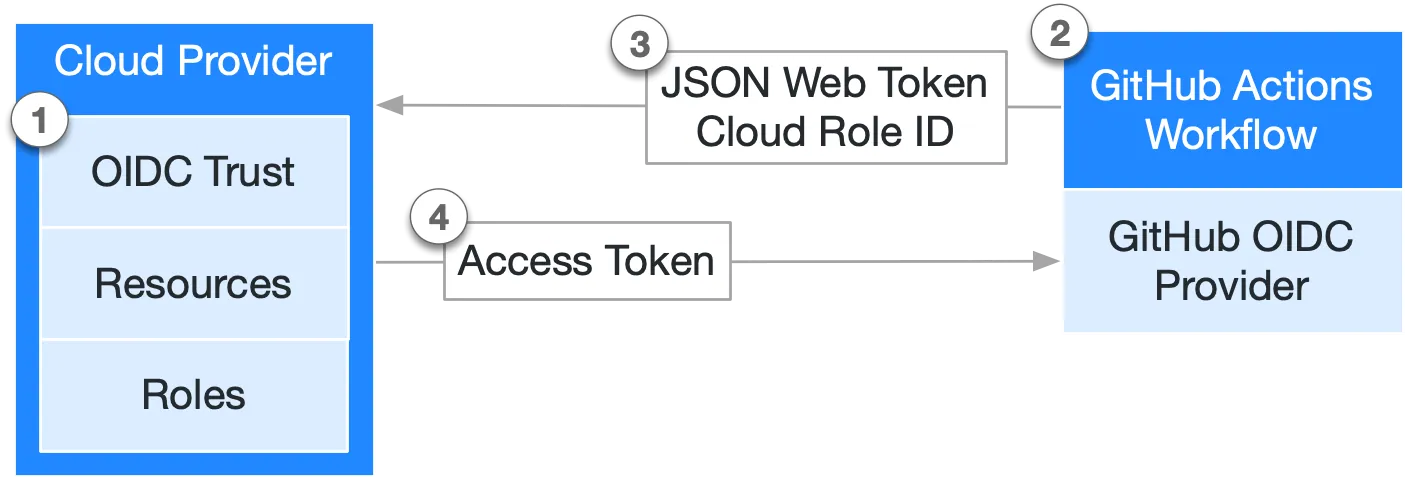
Huawei Cloud does not currently provide an official GitHub Action for OIDC-based credentials. This action fills that gap by configuring temporary credentials (Access Key ID / Secret Access Key / Security Token) for GitHub Actions, using a GitHub OIDC token exchanged with Huawei Cloud Security Token Service (STS). Workflows can access Huawei Cloud resources without storing long-lived Access Key ID / Secret Key pairs in GitHub Secrets. Comparable actions for other clouds and platforms include:
aws-actions/configure-aws-credentialsazure/logingoogle-github-actions/authaliyun/configure-aliyun-credentials-actioneverpcpc/tencentcloud-oidc-authhashicorp/vault-actionjfrog/setup-jfrog-clipypa/gh-action-pypi-publish
jobs:
  example:
    runs-on: ubuntu-slim
    permissions: {id-token: write, contents: read}

    steps:
      - name: 🔑 Generate Huawei Cloud temporary credentials
        id: creds
        uses: vbem/configure-huawei-cloud-credentials@hash
        with:
          provider-urn: iam::<account-id>:oidcProvider:<provider-name>
          agency-urn: iam::<account-id>:agency:<agency-name>

      - name: 🔍 Print outputs of previous step
        env: {STEP_OUTPUTS: "${{ toJson(steps.creds.outputs) }}"}
        run: jq -C <<<"$STEP_OUTPUTS"

      - name: 🖥️ Setup Huawei Cloud KooCLI for testing
        uses: vbem/setup-hcloud@hash

      - name: 🧪 Test temporary credentials using KooCLI
        run: |-
          hcloud sts GetCallerIdentity --cli-region=cn-east-3 \
            --cli-access-key="${HUAWEICLOUD_SDK_AK}" \
            --cli-secret-key="${HUAWEICLOUD_SDK_SK}" \
            --cli-security-token="${HUAWEICLOUD_SDK_SECURITY_TOKEN}" \
            | jq -C
Notes:
- The workflow must grant
id-token: writepermission so GitHub Actions can issue an OIDC token for this action. - This composite action requires
bash,curl, andjq. These tools are pre-installed on the official Unix-like GitHub-hosted runners.
| ID | Type | Default | Description |
|---|---|---|---|
provider-urn |
String | Required | The Huawei Cloud IAM v5 OIDC provider URN, in the format iam::<account-id>:oidcProvider:<provider-name>. |
agency-urn |
String | Required | The Huawei Cloud IAM v5 agency URN to assume, in the format iam::<account-id>:agency:<agency-name>. |
audience |
String | sts.huaweicloud.com |
The audience for the GitHub OIDC token. |
session-name |
String | GitHubActions |
The agency session name. |
duration-seconds |
Number | 900 |
The agency session duration, from 900 seconds (15 minutes) to 43200 seconds (12 hours). It's the maximum duration for which the temporary credentials are valid. |
export-env |
Boolean | true |
Whether to export the temporary credentials as environment variables for subsequent workflow steps. |
env-ak-name |
String | HUAWEICLOUD_SDK_AK |
The environment variable name used to export the Access Key ID when export-env is true. |
env-sk-name |
String | HUAWEICLOUD_SDK_SK |
The environment variable name used to export the Secret Access Key when export-env is true. |
env-st-name |
String | HUAWEICLOUD_SDK_SECURITY_TOKEN |
The environment variable name used to export the Security Token when export-env is true. |
sts-region |
String | "" |
The Huawei Cloud STS API region to use. Choose a region that is geographically close to your runner. By default, the action uses ap-southeast-1 (Hong Kong) for GitHub-hosted runners and cn-east-3 (Shanghai) otherwise. |
api-timeout |
Number | 10 |
The timeout seconds for API calls to GitHub and Huawei Cloud STS. |
api-retry |
Number | 2 |
The retry times for API calls to GitHub and Huawei Cloud STS. |
| ID | Type | Description | Example |
|---|---|---|---|
ak |
String | Access Key ID for the temporary credential. | HSTANO........... |
sk |
String | Secret Access Key for the temporary credential. | EoWCQrr........... |
st |
String | Security Token for the temporary credential. | hQpjbi1........... |
expiration |
Datetime | Expiration time for the temporary credential, in RFC 3339 format. | 2026-09-07T03:27:51.158Z |
urn |
String | The assumed agency URN. | sts::<account-id>::assumed-agency:<agency-name>/<session-name> |
id |
String | The assumed agency ID. | <agency-id>:<session-name> |
Before using this action, set up an OIDC provider and agency in Huawei Cloud IAM v5. Legacy IAM v3 does not support OIDC-based agency federation and cannot be used with this action.
Refer to the information below to create the IAM Identity Provider:
| Name | Recommended Value | Description |
|---|---|---|
| Type | OIDC |
The identity provider type. |
| Identity Provider Name | github_com |
A name that identifies github.com. For GitHub Enterprise Server (GHES), use a name that identifies your server. |
| Identity Provider URL | https://token.actions.githubusercontent.com |
The OIDC token issuer for github.com. For GitHub Enterprise Server (GHES), use https://GHES_HOSTNAME/_services/token. |
| Audience | sts.huaweicloud.com |
The OIDC token audience. It must match the audience input of this action. |
| Description | The URL of this action | Helps identify how this provider is used. |
Refer to the information below to create the IAM Agency:
| Name | Recommended Value | Description |
|---|---|---|
| Agency Name | gh-<usage-desc> |
A name that identifies this agency's purpose, e.g. gh-terraform-foobar-prod. |
| Agency Type | Custom trust policy | A custom trust policy can bind the agency to a specific OIDC provider and define flexible trust conditions. |
| Maximum Session Duration | 43200 seconds (12 hours) |
The maximum duration for which the agency can be assumed. The duration-seconds input of this action must not exceed this value. |
| Trust Policy | See below | An IAM agency's Trust Policy controls who can assume the agency and under what conditions. The sample below allows GitHub Actions workflows in a specific repository to assume the agency. You can further restrict the oidc:sub claim by organization, repository, branch, tag, environment, or other workflow context. Note that GitHub's Immutable Subject Claims feature may change the oidc:sub format on github.com, but not on GHES, for repositories created, renamed, or transferred after July 15, 2026. Existing repositories can enable or disable this feature at the repository level in the GitHub UI (Settings > Actions > OIDC > Use immutable subject claim). |
| Description | The URL of the OIDC identity provider | Helps identify how this agency is used. |
Lastly, attach one or more IAM identity policies to the agency. Remember to follow the principle of least privilege and grant only the permissions necessary for your workflows.
- PR is welcome!
- Donations are NOT needed.
- If you like this action, please consider giving it a ⭐️ — it helps others discover this tool.